

Description
Sidcraft Cloud Media Offload frees up your hosting space by moving every file you upload to the Media Library into your own cloud storage. It works in the background and is transparent: you upload media exactly as before, WordPress creates its image sizes, and the plugin moves the original and every generated size to the cloud, then serves them from there.
Offloading
- Cloud drives: Dropbox, OneDrive, OneDrive for Business / SharePoint document libraries, Google Drive, Box and iCloud (Apple CloudKit).
- Object storage & CDN: Amazon S3 (and S3-compatible services), DigitalOcean Spaces (optional Spaces CDN), Bunny.net Storage + CDN (with token authentication) and Cloudinary.
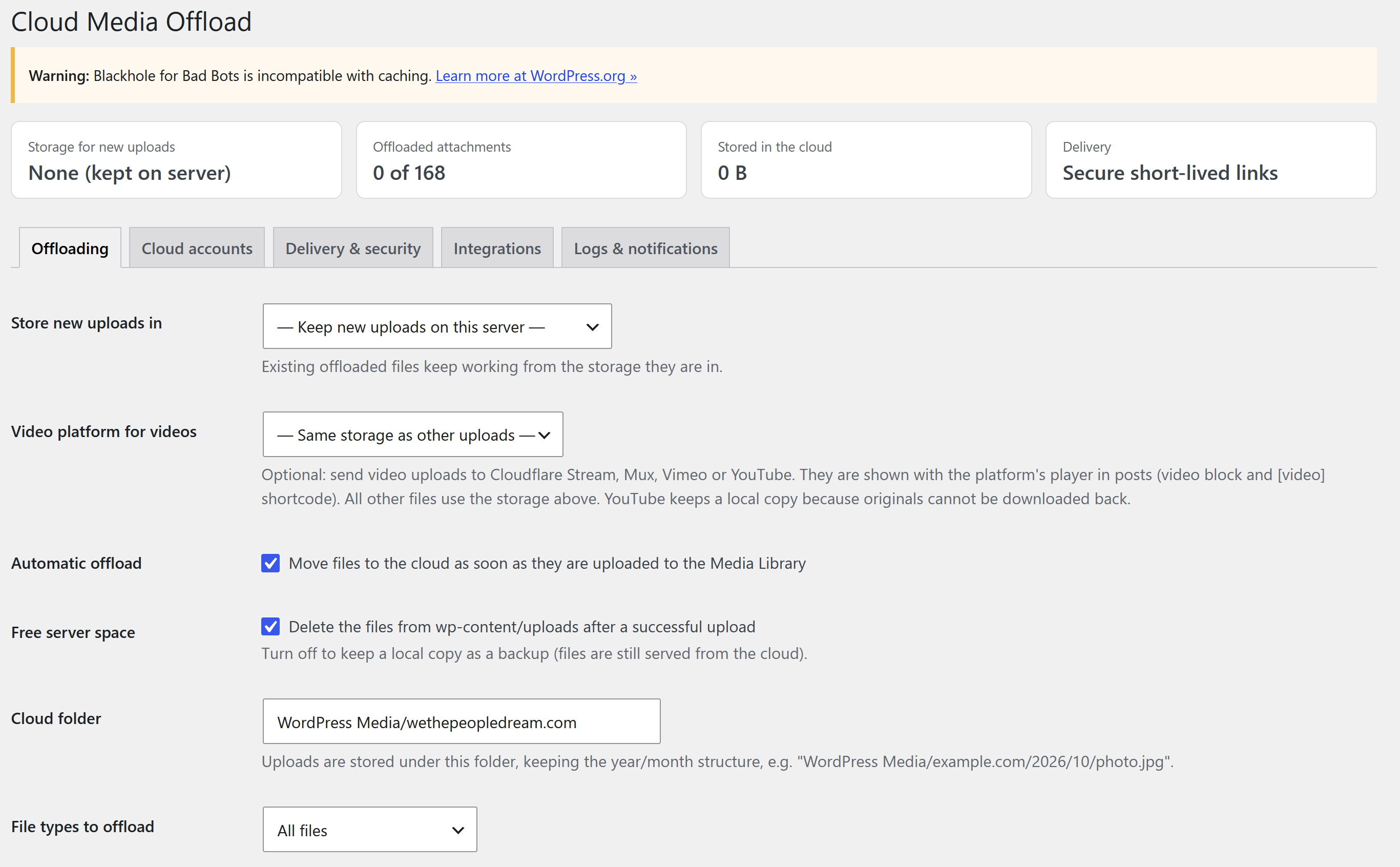
- Video platforms: send video uploads to Cloudflare Stream, Mux, Vimeo or YouTube while all other files go to your main storage. Videos are shown with the platform’s player in the video block and the [video] shortcode.
- Automatic: new uploads (originals, scaled images and every thumbnail size) move to the cloud right after upload.
- Large files are moved in the background with WP-Cron, using each provider’s chunked/resumable upload API.
- Optional: keep a local backup copy, or delete files from
wp-content/uploadsto save space. - Choose which file types to offload (all, images, media, or a custom extension list) and which to always keep local.
- Image editor and thumbnail regeneration keep working: edited files are pushed to the cloud automatically.
- Deleting a file from the Media Library also deletes (trashes) the cloud copy – optional.
- Media Library “Storage” column, row actions and bulk actions: move to cloud, move back, download local copy, remove local copy.
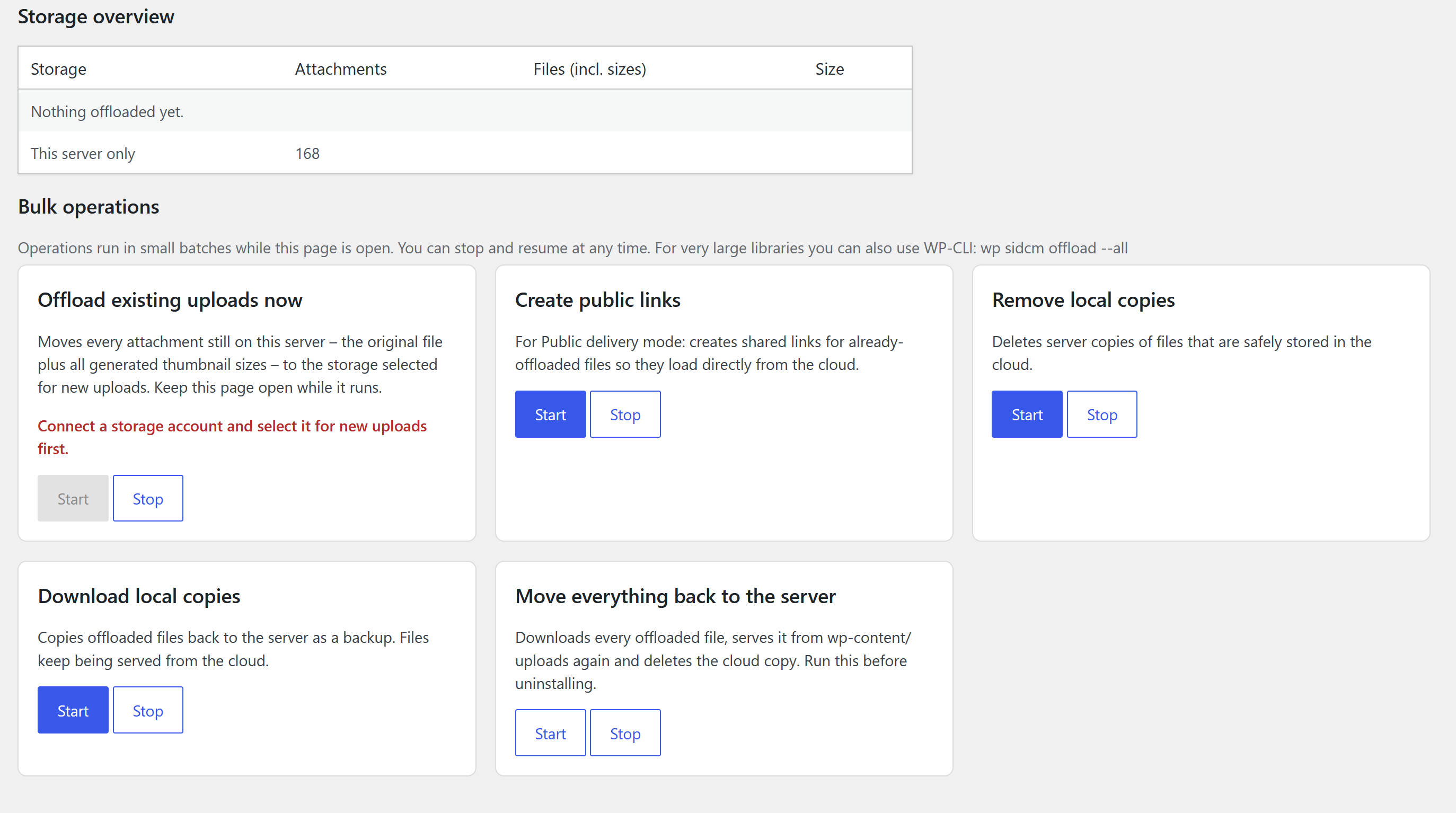
- Existing uploads: offload your whole existing library (originals plus every thumbnail size) with one click and a progress bar – from the Cloud Media dashboard, the Offloading settings or the Tools screen – or let it run in the background with WP-Cron.
- Tools screen to create public links, download local copies or move everything back to the server.
- WP-CLI:
wp sidcm offload --all,wp sidcm restore --all,wp sidcm status.
Delivery & security
- Offloaded files get stable URLs on your own domain (for example
https://example.com/cloud-media/2026/10/photo.jpg) that mirror the uploads structure, so responsive images (srcset), the block editor and other plugins keep working. - Secure mode (default): every request is redirected to a short-lived, signed link created by the provider. Cloud files stay private.
- Public mode: permanent “anyone with the link” shares for the fastest delivery (Dropbox, Google Drive, Box).
- Per-file access: restrict any attachment to logged-in users.
- Existing post content that still points to
wp-content/uploadsis rewritten to the cloud URLs. - OAuth tokens and client secrets are encrypted at rest. Each site uses its own cloud apps – files never pass through a third-party relay.
Cloud modules (shortcode & block)
Show any folder of your cloud storage on a page with the Cloud Module block or the [sidcm_cloud] shortcode:
- File browser with breadcrumbs, search and sub-folder navigation (scope-locked to the configured folder)
- Image gallery with lightbox, and image carousel
- Download list and single download button
- Audio and video players with playlists, streamed from the cloud
- Document embed (Office and PDF previews where the provider supports it)
- Upload box with drag & drop; files go directly from the visitor’s browser to the cloud where the provider allows it (Dropbox up to 150 MB, OneDrive and Google Drive any size, Box up to 50 MB), otherwise in chunks through your server
- Personal folders:
folder="Clients/%user_login%"shows every logged-in user only their own folder – ideal for client portals - Role-based access, password protection, e-mail notifications on uploads and downloads
Integrations
- WooCommerce downloadable products and Easy Digital Downloads files are delivered from the cloud: after the store verifies the purchase, the customer is redirected to a short-lived cloud link. Store files are never public. A cloud file picker creates “store links” for any file in your cloud storage.
- Sidcraft Commerce: sell digital downloads from the cloud. Attach cloud files to products; when an order is paid, customers get secure links (with download limits and expiry) in their order e-mail and on a
[sidcm_my_downloads]page. Links are revoked if the order is cancelled or refunded. - Sidcraft Page Builder: a native “Cloud Module” unit with every module type.
- Contact Form 7, WPForms, Gravity Forms and Fluent Forms: files uploaded through forms are copied to the cloud automatically (with an optional e-mail containing the links).
Cloud Media dashboard
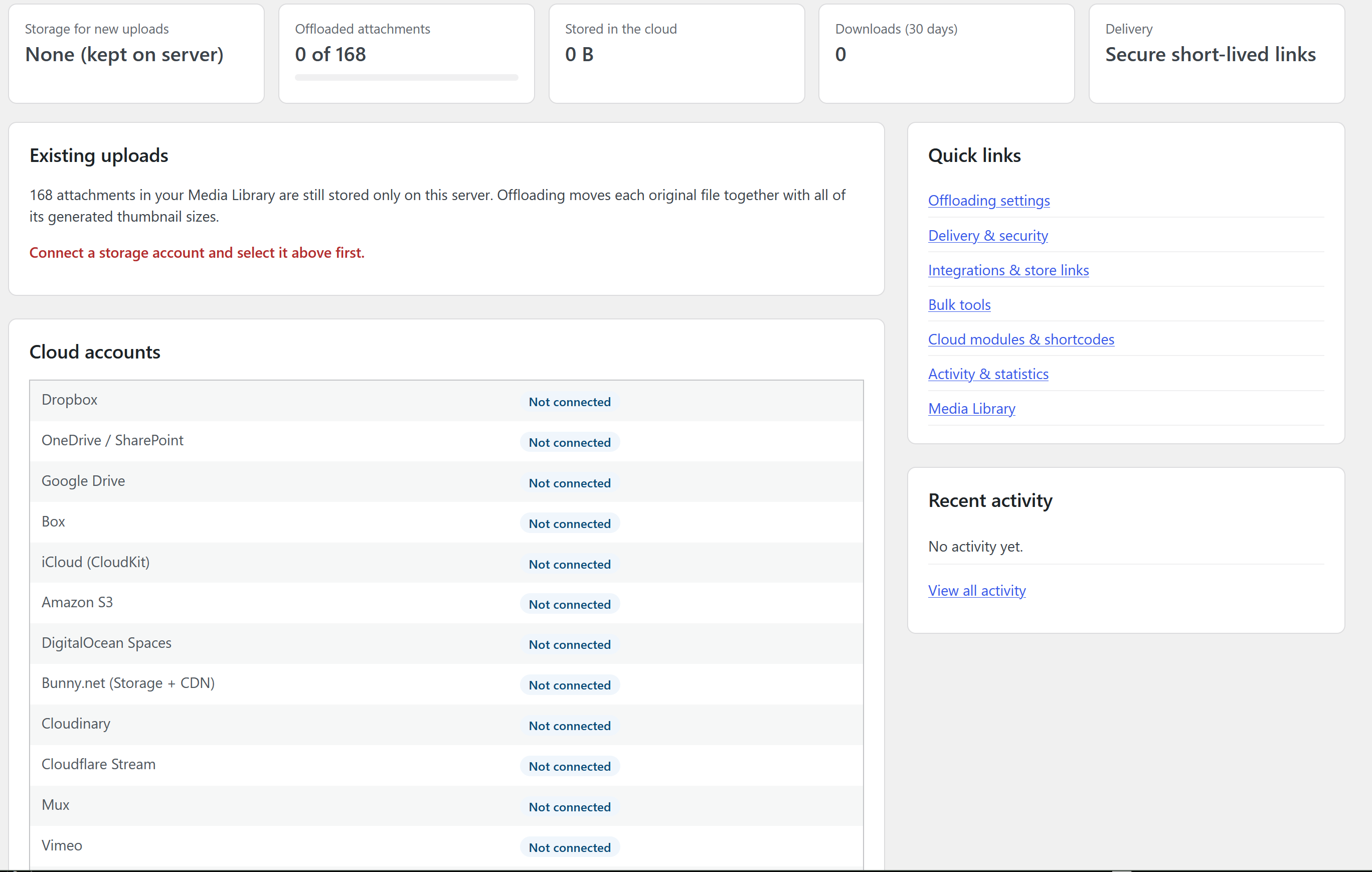
The plugin has its own dashboard (Cloud Media Dashboard) with storage figures, one-click offloading of existing uploads, connected accounts, integrations, recent activity and quick links.
Activity log & statistics
Track offloads, uploads, downloads and errors; see the most downloaded files over the last 30 days. Logged data is included in WordPress’ personal data export and erase tools.
External services
This plugin connects to the cloud storage services that an administrator chooses to connect. Nothing is sent to any service until an administrator enters their own app credentials and clicks “Connect”. No data is sent to the plugin author.
What is sent and when:
- When connecting an account (OAuth): the administrator’s browser is sent to the provider’s sign-in page; the site then exchanges the returned authorization code for access tokens.
- When a file is uploaded to the Media Library (or moved with the Tools page / WP-CLI): the file and its generated image sizes, with their file names, are uploaded to the connected account.
- When an offloaded file is viewed or downloaded: the site requests a temporary download link from the provider, and the visitor’s browser downloads the file directly from the provider (which receives the visitor’s IP address and browser information). In Google Drive private mode the file is downloaded by the site and streamed to the visitor.
- When a Cloud Module is displayed or used: the site lists the configured folder; files are delivered as above; files uploaded by visitors through an upload box are sent to the configured folder.
- When a Media Library file is deleted (if enabled): a delete/trash request is sent for the cloud copy.
Services:
- Dropbox (Dropbox, Inc.) – API hosts api.dropboxapi.com, content.dropboxapi.com, www.dropbox.com. Terms of Service, Privacy Policy.
- Microsoft OneDrive / SharePoint via Microsoft Graph (Microsoft Corporation) – API hosts login.microsoftonline.com, graph.microsoft.com. Microsoft Services Agreement, Privacy Statement.
- Google Drive (Google LLC) – API hosts accounts.google.com, oauth2.googleapis.com, www.googleapis.com; files may be delivered from drive.usercontent.google.com. Google Terms of Service, Google Drive Terms, Privacy Policy.
- Box (Box, Inc.) – API hosts account.box.com, api.box.com, upload.box.com; files are delivered from Box download hosts. For direct uploads the site requests a down-scoped, folder-limited upload token that is given to the visitor’s browser. Terms of Service, Privacy Notice.
-
iCloud via Apple CloudKit Web Services (Apple Inc.) – API host api.apple-cloudkit.com; files are uploaded to and delivered from Apple’s CloudKit asset hosts. Requests are signed with the server-to-server key you provide. iCloud Terms, Apple Privacy Policy.
-
Amazon S3 / S3-compatible storage (Amazon Web Services, Inc., or the provider of the endpoint you enter) – the bucket’s regional API host (s3.{region}.amazonaws.com) or your custom endpoint, and the CDN address you enter. Requests are signed with your access key. AWS Customer Agreement, AWS Privacy Notice.
- DigitalOcean Spaces (DigitalOcean, LLC) – {region}.digitaloceanspaces.com and, with Spaces CDN on, {space}.{region}.cdn.digitaloceanspaces.com. Terms of Service, Privacy Policy.
- Bunny.net (BunnyWay d.o.o.) – the storage API host of the selected region ({region}.storage.bunnycdn.com) and the Pull zone hostname you enter. Terms of Service, Privacy Policy.
- Cloudinary (Cloudinary Ltd.) – api.cloudinary.com for uploads and management; files are delivered from res.cloudinary.com. Terms of Use, Privacy Policy.
- Cloudflare Stream (Cloudflare, Inc.) – api.cloudflare.com for uploads and playback tokens; videos play from your Stream customer subdomain (customer-….cloudflarestream.com) or iframe.videodelivery.net. Terms, Privacy Policy.
- Mux (Mux, Inc.) – api.mux.com for uploads; videos play from stream.mux.com and player.mux.com. Terms of Service, Privacy Policy.
- Vimeo (Vimeo.com, Inc.) – api.vimeo.com for uploads; videos play in player.vimeo.com. Terms of Service, Privacy Policy.
- YouTube (Google LLC) – accounts.google.com / oauth2.googleapis.com for sign-in and www.googleapis.com for uploads; videos play in the privacy-enhanced player at www.youtube-nocookie.com. YouTube Terms of Service, Google Privacy Policy.
When a page shows a video stored on a video platform, the visitor’s browser loads that platform’s player, which receives the visitor’s IP address and browser information.
Direct uploads: when a visitor uses an upload box and direct uploads are enabled, their browser sends the file straight to the provider listed above, using a short-lived upload session that this site creates for that single file.
Screenshots
Blocks
This plugin provides 1 block.
- Cloud Module Show a file browser, gallery, carousel, download list, player, document embed or upload box from Dropbox, OneDrive, Google Drive or Box.
Installation
- Upload the plugin folder to
/wp-content/plugins/or install it through Plugins Add New, then activate it. - Go to Cloud Media Settings Cloud accounts.
- Copy the Redirect URI shown at the top of the page.
- Register an app with the provider you want to use (a link to each developer console is shown on its card), add the Redirect URI, and paste the client ID and secret into the card. Save.
- Click Connect and approve access.
- On the Offloading tab choose the storage for new uploads. From now on, uploads move to the cloud automatically.
- Optional: use Cloud Media Tools Move existing media to the cloud for your existing library.
Your site needs pretty permalinks for the /cloud-media/ URLs; with plain permalinks a ?sidcm_file= URL is used instead. Box, Microsoft and Google require HTTPS for the redirect URI on public sites.
FAQ
-
Do my visitors notice anything?
-
No. Pages keep the same markup and URLs on your own domain; only the files are delivered from the cloud.
-
What happens if I deactivate or delete the plugin?
-
Files that were removed from the server are only in the cloud, so they stop loading. Before deactivating permanently, run Tools Move everything back to the server. Cloud files are never deleted when the plugin is deleted.
-
Does iCloud work with my personal iCloud Drive?
-
No. Apple does not offer a public API for personal iCloud Drive. The plugin uses Apple’s CloudKit Web Services: files are stored in a CloudKit container that belongs to your Apple Developer account (membership required). The settings card explains the one-time schema setup.
-
How do I sell cloud files with WooCommerce or Easy Digital Downloads?
-
Either choose a Media Library file as usual (it is offloaded and protected automatically), or open Cloud Media Settings Integrations, browse your storage with the cloud file picker and paste the store link into the product’s file URL. Customers download through the store’s normal, verified download links.
-
How do I sell cloud files with Sidcraft Commerce?
-
Edit a product, open the “Cloud downloads” box and paste a store link (from Cloud Media Settings Integrations) or a Media Library file URL. Set a download limit and expiry. Customers receive the links when their order is paid; add the
[sidcm_my_downloads]shortcode to an account page so they can find them later. -
Which storage should I pick?
-
Cloud drives (Dropbox, OneDrive, Google Drive, Box, iCloud) suit sites that already keep files there. Object storage with a CDN (Amazon S3, DigitalOcean Spaces, Bunny.net, Cloudinary) is the fastest and cheapest for busy sites. Video platforms (Cloudflare Stream, Mux, Vimeo, YouTube) transcode videos and stream them adaptively; choose one under “Video platform for videos” and keep a regular storage for everything else.
-
Can I use several clouds at once?
-
New uploads go to one selected storage, but files already offloaded keep working from wherever they are, and every connected account can be used in Cloud Modules.
-
Why do I need to create my own app?
-
So that your files and tokens never pass through anyone else’s servers, and so you control the permissions. The plugin requests the least access it needs (for Google Drive, only files created by the plugin unless you choose full access).
-
Is OneDrive “public mode” supported?
-
OneDrive does not offer stable public file URLs suitable for embedding, so OneDrive always uses short-lived download links, which the plugin caches.
-
Does it work on multisite?
-
Yes. Each site has its own settings, accounts and tables.
Reviews
There are no reviews for this plugin.
Contributors & Developers
“Sidcraft Cloud Media Offload” is open source software. The following people have contributed to this plugin.
Contributors
Translate “Sidcraft Cloud Media Offload” into your language.
Interested in development?
Browse the code, check out the SVN repository, or subscribe to the development log by RSS.
Changelog
1.4.2
- Changed: large uploads are streamed through the WordPress HTTP API (http_api_curl hook) instead of direct cURL calls.
- Fixed: the file browser only opens subfolders that exist in the storage, so made-up folder paths in the URL no longer create cache entries or storage requests.
1.4.1
- Changed: text domain matches the plugin slug (sidcraft-cloud-media-offload).
- Changed: admin notices appear only on the plugin’s own screens.
- Fixed: nonce is verified before Media Library row actions read their parameters.
1.4.0
- New: Amazon S3 (and S3-compatible), DigitalOcean Spaces, Bunny.net Storage + CDN and Cloudinary storage.
- New: video platforms – Cloudflare Stream, Mux, Vimeo and YouTube – for video uploads, with their players in posts.
- New: direct browser uploads to Amazon S3 with presigned links.
- Changed: Plugin URI.
1.3.0
- Fixed: Plugin Check issues (translator comments and placeholder handling in folder help texts; Google Drive images are served from Drive’s own download link).
- Changed: the Sidcraft cards are shown at the top of the Cloud Media dashboard.
1.2.0
- New: Cloud Media dashboard page (replaces the WordPress Dashboard widget).
- New: Sidcraft Commerce digital downloads from cloud storage, with download limits, expiry, order e-mail links and a [sidcm_my_downloads] shortcode.
1.1.0
- New: iCloud storage through Apple CloudKit Web Services.
- New: offload existing uploads (originals + thumbnails) from the Offloading settings, the Dashboard widget or in the background.
- New: direct browser-to-cloud uploads for Dropbox, OneDrive, Google Drive and Box, with automatic fallback.
- New: WooCommerce and Easy Digital Downloads delivery from the cloud, with a cloud file picker for store links.
- New: Sidcraft Page Builder “Cloud Module” unit.
- New: Contact Form 7, WPForms, Gravity Forms and Fluent Forms uploads saved to the cloud.
- Improved: Google Drive files shown in modules are shared automatically when link sharing is on.
1.0.0
- Initial release.