

Description
This plugin publishes your WooCommerce products as a product feed in Google’s format, at a private link on your own site. You paste the link into Google Merchant Center once. Each time the link is opened, the feed is built from your catalogue, with the prices and stock in your shop at that moment.
It is free, with no account and no sign-up, and the plugin sets no limit on the number of products.
See a feed it produced on a WooCommerce test shop, or check a feed you already have, free.
Features
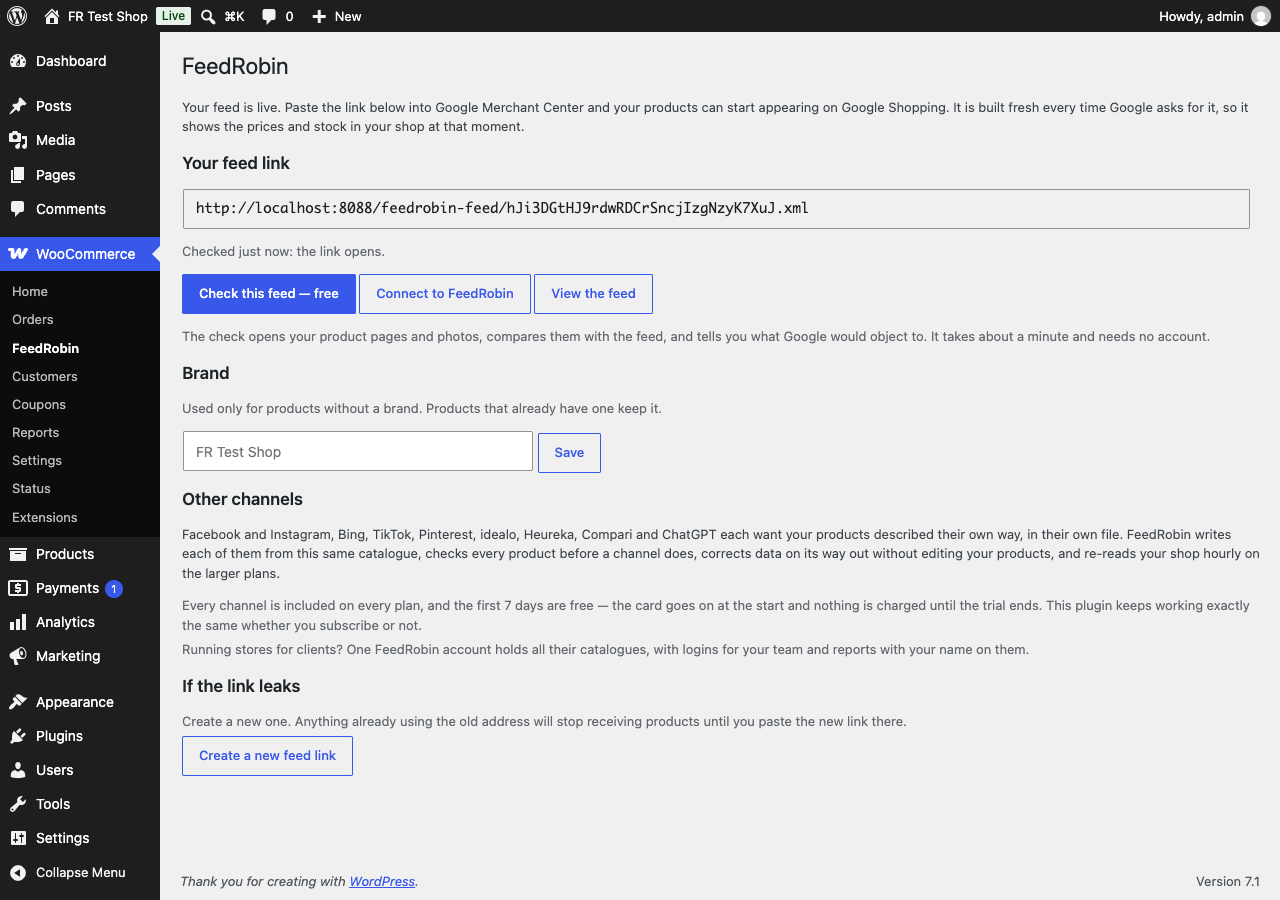
- One link. WooCommerce FeedRobin shows the feed link and checks that it opens.
- Built on every fetch. There is no schedule to set and no file to upload.
- Variations as separate items. Each variation is sent with its own price and stock, linked to its product.
- Prices and sales. Prices in US and Canadian dollars are sent without tax, prices in other currencies with tax. A sale price is sent only while the sale is running.
- Identifiers, brand and condition. Read from the fields and attributes your shop already has, listed below.
- Nothing written to your products. The plugin stores six settings and deletes them when it is uninstalled.
What the feed contains
The feed is an XML file (RSS 2.0) with the attribute names of Google’s product data specification. Each item has:
id: the product or variation ID.title: the product name; for a variation, the product name and its attribute values, such as “Hoodie – Blue, Large”. At most 150 characters.description: the variation’s description, else the product’s short description, else its description, without HTML, at most 5,000 characters. Left out when all three are empty.link: the product page.image_link: the variation’s image, else the product image.additional_image_link: up to 10 images from the product gallery.price: in the shop’s currency, without tax in US and Canadian dollars and with tax in other currencies.sale_price: only while a sale is running.availability:in_stock,out_of_stockorbackorder.condition:new,usedorrefurbished, from a product attribute called Condition or from the condition field of Google for WooCommerce;newwhen neither has one of these values.item_group_id: the product’s ID, on each of its variations.brand: from WooCommerce’s brand taxonomy, Perfect Brands, YITH, or a product attribute called Brand; else from the Brand field in the plugin settings, which is empty by default.gtin: from the GTIN, UPC, EAN or ISBN field of the variation, else of the product, or from Google for WooCommerce when that field holds no valid GTIN. A GTIN with a wrong length or check digit, or a placeholder such as all zeros, is left out.colorandsize: from attributes named Color, Colour or Farbe, and Size, Größe, Groesse or Grosse, with the names your shop displays. On a simple product, only when the attribute has one value.product_type: the product’s deepest category with its parent categories, such as “Clothing > Shirts > Tees”.shipping_weight: the product’s weight, with the shop’s weight unit.
What it does not do
- It does not send anything. Merchant Center, or any other service you give the link to, fetches the feed from your site.
- It does not change your products or your shop pages. The plugin stores six small settings in WordPress: the code in your feed link, the default brand, the install date, how many times the feed has been read, and whether its two notices were dismissed. Uninstalling deletes all six.
- It does not fill the five custom labels (
custom_label_0tocustom_label_4) and does not send the SKU asmpn. - It does not send
identifier_exists. Outside the media and apparel cases, Google’s product data specification asks for it, set tono, on products that have no GTIN and no MPN with a brand. - It has no product filters, no field or category mapping, and no currency or language settings: one feed, in the shop’s currency, with every product the FAQ below does not list as left out.
- It writes Google’s format only.
Other channels
Meta’s Commerce Manager accepts a file formatted for Google: when you add a data feed, choose Google Merchant Center under “Which platform is your file formatted for?” and paste the link under Use a URL (Meta’s steps).
FeedRobin, our paid service, writes a feed for each of these channels from the same catalogue: Google Shopping, Facebook & Instagram, Microsoft / Bing Shopping, TikTok, Pinterest (beta), Heureka.cz / Heureka.sk, Compari.ro / Árukereső.hu, idealo.de / idealo.at (beta), ChatGPT / OpenAI, llms.txt for AI assistants (beta) and Custom XML feed.
Free feed check
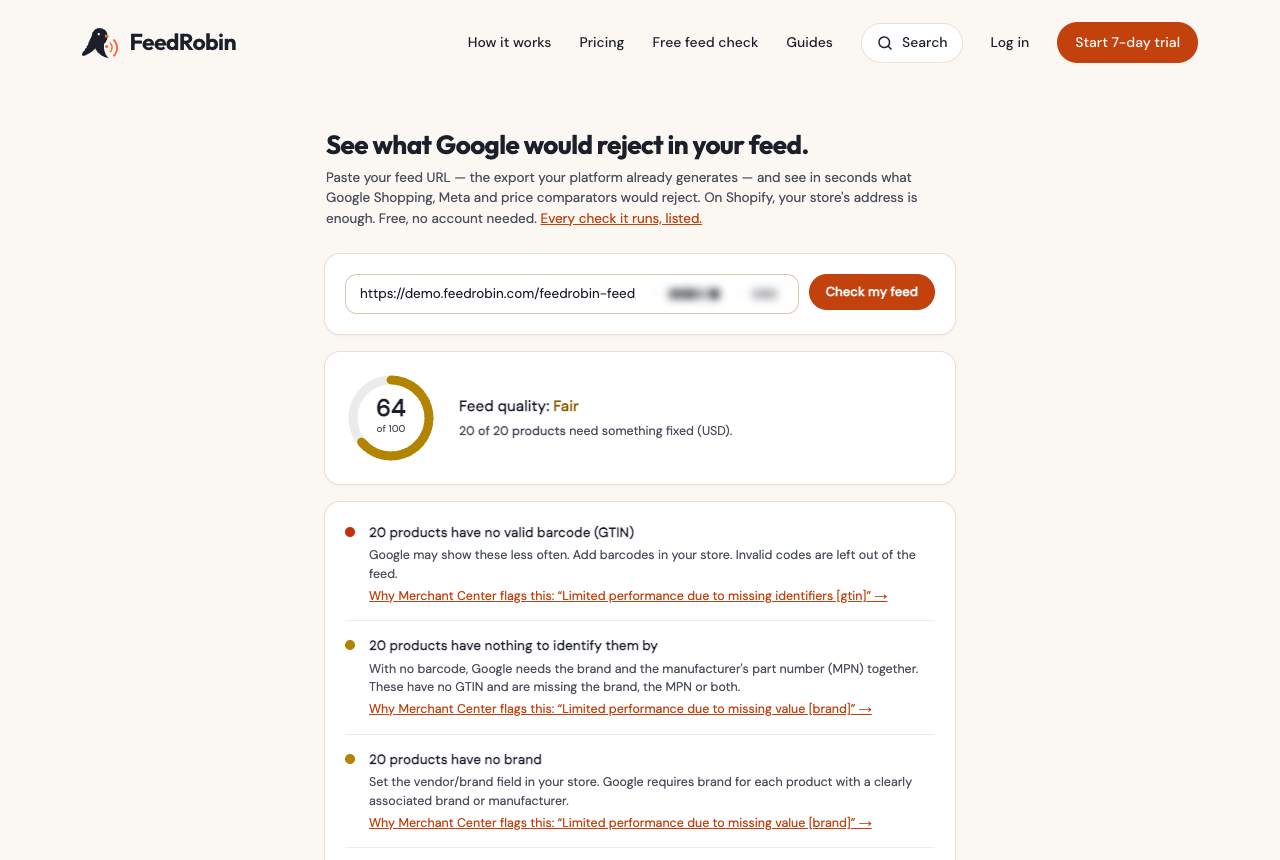
feedrobin.com/audit checks a feed link without an account. It reads the feed, compares the price on a sample of product pages with the price in the feed, measures a sample of the images, and lists the issues it finds, the most serious first. The Check this feed button on the settings screen opens it with your link filled in.
FeedRobin, the paid service
- A feed for each channel listed above, from this same catalogue.
- A check of every product in the catalogue, in the FeedRobin dashboard.
- Rules and title templates that change what a channel receives, without editing your products. A rule cannot change the price, sale price, currency, ID or link.
- Your shop re-read every hour on the Growth, Scale and Agency plans, and once a day on Starter.
Plans from €39 a month, every channel included on every plan. 7 days free — the card goes on at the start and nothing is charged until the trial ends. The Connect to FeedRobin button on the settings screen opens FeedRobin with your feed link filled in. This plugin works the same whether you use it or not.
Running stores for clients? One FeedRobin account holds all their catalogues — the Agency plan pools 100,000 products across every store you manage, with ten logins for your team and reports with your name on them.
External services
The plugin makes no outbound requests of any kind. It does not send your catalogue, your settings or any usage data anywhere. The settings screen opens your own feed link in the background to check that it opens; that request goes only to your shop.
Two buttons on its settings screen and one link in its one-time welcome notice are ordinary links to feedrobin.com: Check this feed (in the notice, Check it free) opens the free feed check, and Connect to FeedRobin opens the service, each with your feed link in the address. The one-time review request links to wordpress.org. Nothing is transmitted unless you follow a link, and the check needs no account. FeedRobin is a separate paid subscription with its own terms and privacy policy; using this plugin does not require it, and the plugin works the same without a subscription.
Screenshots
Installation
Requirements
WordPress 6.5 or later, PHP 7.4 or later, and WooCommerce installed and active. Version 1.0.14 was tested with WordPress 7.1, WooCommerce 11.2.0 and PHP 8.3, and with WooCommerce 9.1.4. The plugin declares compatibility with WooCommerce’s high-performance order storage; it does not read or write orders.
In WordPress
- Go to Plugins Add New and search for FeedRobin.
- Install and activate. WooCommerce must be active.
- Go to WooCommerce FeedRobin and copy the feed link — or press Check this feed first.
In Google Merchant Center
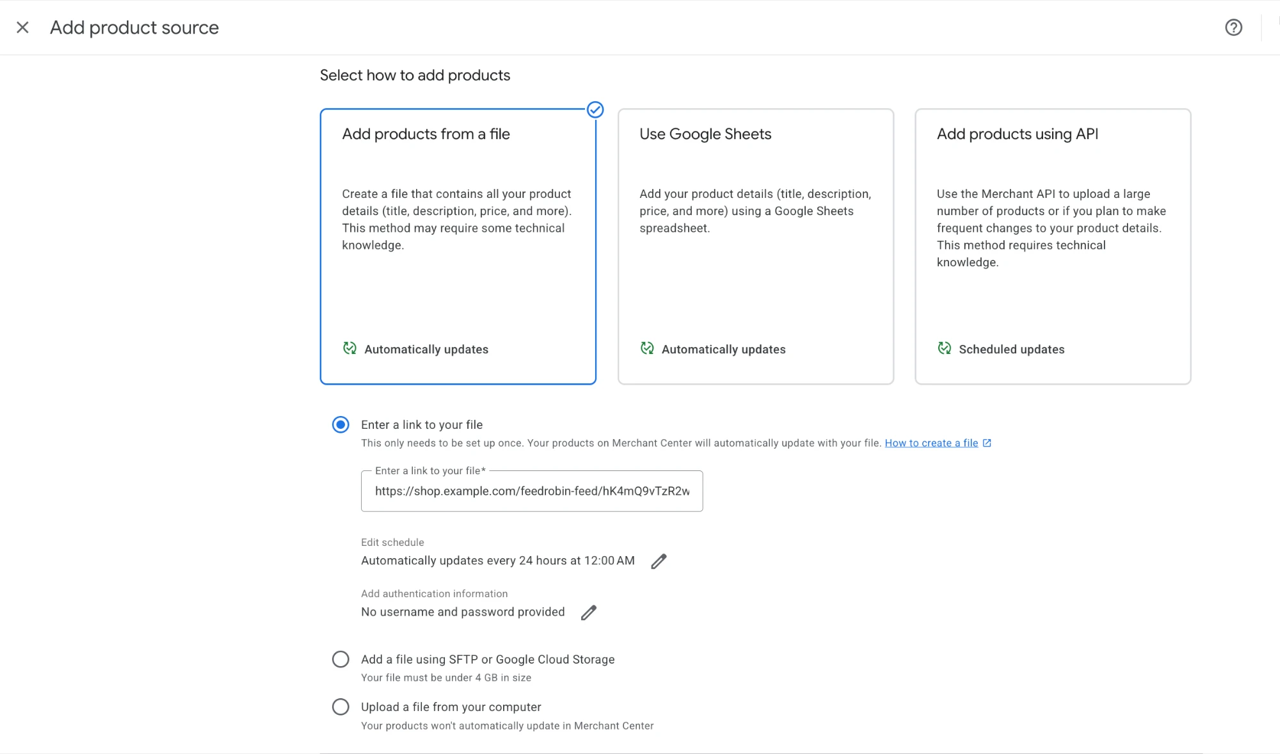
- Go to Settings Data sources and press Add product source.
- Choose Add products from a file.
- Under Enter a link to your file, paste the feed link.
- Press Continue. By default, Merchant Center fetches the file every 24 hours; the schedule can be changed.
Google’s steps: Add products from a file to Merchant Center.
FAQ
-
How do I get my WooCommerce products on Google Shopping?
-
Activate this plugin, copy the link from WooCommerce FeedRobin, and in Merchant Center go to Settings Data sources Add product source Add products from a file and paste it under Enter a link to your file. Merchant Center then fetches the file, reviews the products and lists any issues on the Products page.
-
How often does the feed update?
-
On every fetch: the feed is built at the moment it is requested, from what your shop holds then. By default, Merchant Center fetches the file every 24 hours, and the schedule can be changed there.
-
Which products are not in the feed?
-
Products that are not published, hidden from the catalogue or protected by a password; grouped and external products; and products with a price of 0. Variable products are sent as their variations.
-
Can I leave products out of the feed?
-
The plugin has no filter of its own. The products it leaves out are the ones listed in the answer above.
-
What happens to out-of-stock products?
-
They stay in the feed, with
availabilityset toout_of_stock. Products on backorder are sent asbackorder. -
I sell sizes and colours. What does Google see?
-
Each variation, not the parent product, as its own item with its own price and stock. Every variation carries the parent’s ID in
item_group_id, and its title names the variation. -
Google says my products have no brand.
-
The feed uses the brand from WooCommerce brands, Perfect Brands, YITH, or the product’s
brandattribute. If a product has none of these, the Brand field in the settings is used. It is empty by default. -
Does it support several currencies or languages?
-
The plugin has no settings for either. Every price is written in the currency WooCommerce reports for the shop, and each shop has one feed link. It has not been tested with currency or translation plugins.
-
Will this work for Facebook and Instagram?
-
Meta’s Commerce Manager accepts a file formatted for Google: when you add a data feed, choose Google Merchant Center under “Which platform is your file formatted for?”. FeedRobin writes Meta a separate feed with Meta’s own values.
-
Do I have to pay for FeedRobin to use this?
-
No. The feed link works without FeedRobin and has no limits or time restriction. FeedRobin is a separate subscription for checking the catalogue and writing feeds for other channels.
-
Is my feed link private?
-
The link contains a random 32-character code and is not linked from your shop, and the feed asks search engines not to index it. It holds only products shoppers can reach in your shop. To replace the link, press Create a new feed link on the settings screen; the old address stops working at once.
-
Will it slow my shop down?
-
The feed is built only when its link is requested, in batches of 200 products. Shop pages and the checkout do not build it.
-
Does it work with my theme?
-
The feed does not use your theme: it reads products through WooCommerce and is sent before WordPress loads a page template.
-
Why is my Merchant Center feed empty?
-
A page cache can store a feed that is sent in pieces as its last piece only: a well-formed file with no products in it. This plugin sets the
DONOTCACHEPAGEconstant and closes any output buffer already open before it sends the feed. If you use a page cache and still see an empty feed, tell us in the support forum which one. -
My link says “not found”.
-
It should not, since 1.0.4: the feed answers to its address directly, whether or not WordPress’s list of pretty addresses knows about it. If you still see “not found”, your server is not sending unknown addresses to WordPress at all — the usual cause is a missing
.htaccesson Apache. Saving Settings Permalinks once rewrites it; or use the plain-permalink form of the link, which the settings screen shows when pretty permalinks are off.If the “not found” page is your theme’s, the plugin is not running when the link is opened: check that it is active, and that no other plugin switches it off on the front end.
Reviews
There are no reviews for this plugin.
Contributors & Developers
“FeedRobin Product Feed for WooCommerce” is open source software. The following people have contributed to this plugin.
Contributors
Translate “FeedRobin Product Feed for WooCommerce” into your language.
Interested in development?
Browse the code, check out the SVN repository, or subscribe to the development log by RSS.
Changelog
1.0.14
- Weights in pounds are written with the unit lb, which Google’s shipping_weight lists; WooCommerce stores the unit as lbs.
- The review request can be closed with its × button. After × or Leave a review, it does not come back.
1.0.13
- Catalogues of more than 200 products are served faster. From the 201st product on, the site’s settings were read from the database again each time one was needed; they now stay in memory while the feed is built. The feed’s content does not change.
- Settings screen: the Other channels paragraph describes the paid service as this listing does.
1.0.12
- Prices in US dollars or Canadian dollars are sent without tax. Google asks for prices without tax in the United States and Canada; other currencies keep the price with tax, as before.
- The GTIN is also read from Google for WooCommerce when the WooCommerce GTIN field holds no valid GTIN.
- A GTIN with a wrong length or check digit, or a placeholder such as all zeros, is left out of the feed.
- identifier_exists is no longer sent for products without a GTIN.
- Works with WooCommerce versions older than 9.2.
- Settings screen: the free trial is 7 days.
1.0.11
- Settings screen: checks that the feed link opens, as a visitor would, and shows the result.
1.0.10
- Products with a price of 0 are no longer sent. Merchant Center reported these products with an invalid price or invalid sale price.
- Settings screen: shorter texts.
1.0.9
- Used and refurbished products now reach Google with their real condition. The plugin reads it from a product attribute called Condition, or from the condition field of Google for WooCommerce; products with neither are sent as new.
1.0.8
- Large catalogues are served in full on more hosting setups. 1.0.7 fixed this for most sites; on some, the feed could still run out of memory.
- The settings screen names TikTok and Pinterest among the channels.
1.0.7
- Large catalogues are served in full. The feed used to run out of memory on hosts with a fixed memory limit and stop part-way through; it now uses the same small amount of memory whatever the catalogue size.
1.0.6
- Asks for a review once, and only after the feed has been served in full ten times over at least two weeks. Both buttons end it for good.
1.0.5
- New Brand field in the settings. Used only for products without a brand.
- The feed now reads the product’s
brandattribute.
1.0.4
- The feed link works without a permalink save. It used to depend on WordPress’s stored rewrite rules, which can be missing ours after a permalink change or a restore; now the address itself is enough.
1.0.3
- The settings screen names the starting price of the paid service.
1.0.2
- The settings screen mentions the Agency plan for people who run stores for clients.
- Listing text describes the missing feed in neutral terms.
1.0.1
- A shop with no Site Title set now names its feed after its domain instead of leaving the feed’s title empty.
- The settings screen leads with the free feed check, with your link already filled in, and says what the paid service adds.
- A one-time welcome notice after activation points to the link and the check. It goes away when dismissed or once the settings screen is opened, and does not return.
- Display name is now “FeedRobin Product Feed for WooCommerce”. The plugin slug and your feed link are unchanged.
1.0.0
- First release.