
Description
Three people. Three problems. One thread.
In 2021, Melanie came to me.
Marketing expert. Decades of experience. Someone who knows exactly when a tool is working — and when it is just pretending to.
“I need webinars on WordPress,” she said.
“Registration. Reminders. Tracking. Everything connected.”
Everything was already there.
WordPress had the pieces: registration forms, video players, calendar links, thank-you pages, email tools.
Plugins for every single step.
But each one lived in its own world.
No handshake. No memory. No thread connecting them.
Juan spent weeks trying to bridge them manually.
The thank-you page opened without registration — anyone could walk in.
No one knew who had signed up. Who had actually shown up. Who had leaned forward at the offer.
Without that, nothing could run on its own.
Every webinar needed a person holding it together.
Every follow-up was manual. Every sale, a coincidence.
I, Tobias, bought WebinarIgnition in 2022.
Not because it was finished.
Because for the first time, the thread was there.
One flow. Registration -> reminder -> webinar -> offer -> follow-up.
On your own site. With the plugins you already trust.
WooCommerce for checkout inside the webinar room.
Social login so signing up takes three seconds.
Polls, booking forms, countdown timers — anything that keeps people engaged and present.
Webhooks that quietly tell your email marketing tool who showed up and who didn’t.
Heatmaps, A/B tests, analytics — because you want to know what worked, not just that something happened.
And underneath all of it: time.
Time to focus. Time to be present in the webinar, not behind it.
Time to sit with your audience — week after week — until they don’t just know you.
Until they trust you.
That is what a webinar is, at its best.
Not a broadcast. A relationship, built slowly, in front of people who chose to show up.
Tom sold a video course.
Good product. Google Ads. Traffic.
500 people landed on his page.
Zero sales.
The page was beautiful.
Clear. Professional. Probably AI-optimized.
But no one bought.
Not because the offer was wrong.
Because trust takes longer than one page.
Tom stopped trying to sell on arrival.
Instead, he collected something simpler: registrations.
“Come to a live webinar. See who shows up. Hear what they actually ask.”
The first session, he didn’t sell anything.
He just listened.
What do these people worry about? Where are they stuck? What have they already tried?
And something shifted.
Not in his funnel. In the room.
People started answering each other’s questions.
A stranger became a familiar voice.
Tom became someone they had spent an hour with — not a logo on a landing page.
By the third session, he sold the course.
Not because he pitched harder.
Because the room had become a place people wanted to stay.
A webinar is not a funnel.
It is a space.
And people buy from spaces that feel safe.
Bastian sold leather goods online.
Handcrafted. Real quality. Not cheap.
He ran Google Ads directly to his WooCommerce product pages.
People clicked. People looked. People left.
The product page showed the price.
It showed the photos.
It did not show why this leather was different.
Why the stitching mattered. Why the smell of it told a story.
Why someone who buys it once, buys it again for life.
A product page has maybe thirty seconds.
Thirty seconds to explain something that took years to learn how to make.
Bastian started a webinar.
Not a sales pitch. A demonstration.
He showed how the leather ages. How it takes on character with use.
He answered questions live — from people who were genuinely curious, not just browsing.
At the end, the WooCommerce checkout appeared right there — inside the webinar room.
No new tab. No “find it on the shop.” No moment where the feeling cools down.
Just: the product, the price, and a form that already knew his name.
They bought it in the room.
While the feeling was still warm.
Because they didn’t just see a product anymore.
They understood it.
And understanding is the shortest path to trust.
And trust is the shortest path to yes.
New: AI Webinar Content Wizard
You probably don’t wake up in the morning excited to write registration copy and reminder emails.
The AI wizard is there for exactly that.
Answer three simple questions — what your webinar is about, who it is for, and what should happen afterwards.
From there, the wizard creates three registration page versions and four reminder emails in your language.
24 languages included. More on request. Best quality powered by AI.
You don’t lose control. You can read, adjust and translate every line.
But you never have to start from a blank page again.
Generate your first webinar content here
Step-by-step setup playlist (13 videos, AI in video 3):
https://youtube.com/playlist?list=PLlmyTY2pWUgdkumwHqaToKsTGY69XXRQb
Want the latest Gutenberg + AI features early?
Test the 4.08.xx beta builds — close to release candidate quality. Update, check your existing webinars, and if anything feels off, tell us in the live meetings or email support@webinarignition.com — we fix fast, often within hours.
Join a live demo webinar
- Webinar Driver School (English): Beginner to pro — all welcome — Thu 11:30 a.m. ET
- WooCommerce Shop Owners: Triple Your WooCommerce Sales in 30 Minutes
- WooCommerce Agencies: Stop starting every client project from zero
- German (DE): Wednesday 18:30 Berlin time (CET)
- Demo site: https://demo.webinarignition.com/
Free Webinar Plugin for WooCommerce
If you just want to run your next webinar without getting blocked by paywalls, the free version is enough to start.
You can create live, automated and evergreen webinars, collect sign-ups, send reminder emails and show one focused action inside the webinar — all on your own site.
Nothing stops you from going live and testing your idea.
No trial countdown, no hidden attendee limit, no “export disabled” message in your first important moment.
You see how many people signed up.
Individual lead details — name, email, attendance status, custom fields — are visible in the trial and on paid plans.
- Unlimited webinars — live, automated, and evergreen, all types included
- Unlimited attendees — no tiers, no upgrade to unlock more registrants
- See total registrant count in your dashboard
- AI content wizard — translate your webinar pages and emails into any language via AI
- One in-webinar interaction per event — embed polls, booking forms, or any WordPress content via shortcode (since 4.08)
- Registration shortcodes anywhere — footer, sidebar, popup, any page, unlimited times (since 4.08)
- Automated email reminders — confirmation, 1 day before, 1 hour before, when live, after webinar — fully customizable
- Custom registration forms — first name, last name, email, participant reason, UTM parameters, custom fields
- 1-click registration links — attendees click once in their email and are instantly registered
- Per-webinar language, timezone, and date format — your attendees register and convert in their native language
- 24 languages included — hand-translated (English, German), AI-translated (22 languages), more on request
- Page builder compatible — Elementor, Gutenberg, Divi, Beaver Builder, Thrive, Oxygen, Bricks
- GDPR / double opt-in — all data stays on your server, consent fields included
- Social registration via Nextend Social Login plugin (external, free or ~$50 one-time, 22+ providers)
At some point, you will want to see who registered, not just how many.
You will want to trigger follow-up sequences for “attended but did not buy.”
You will want to show a real WooCommerce checkout at the exact moment people are ready.
That is when the paid plans make sense. You don’t have to decide today.
Start free, run a few webinars, and upgrade only when your numbers tell you it is time.
Paid Plans: WooCommerce Shops, Agencies & Creators
- See individual lead details — name, email, attendance status, custom fields, UTM data per registrant (Unlimited plan)
- Unlimited in-webinar interactions — unlimited polls, booking forms, countdown timers, any WP plugin per event (Unlimited plan)
- Webhooks — send registration, attendance, and sales data to ActiveCampaign, Mailchimp, KlickTipp, FluentCRM, or any CRM (Unlimited plan)
- Paid webinars — charge for access via WooCommerce, Stripe, PayPal, Digistore24 (Unlimited plan)
- Bulk lead import/export — CSV mapping, great for agencies managing multiple clients (Unlimited plan)
- WooCommerce checkout inside the webinar room — display product offers at peak interest, auto-fill customer data, no redirect, no drop-off (Plus plan)
- External CTAs via iframe — show external checkout pages, booking tools, or registration forms as live CTAs inside the webinar (Plus plan)
- 100ms video meetings — up to 20,000 participants, 10,000 free minutes/month, ultra-low latency (Plus plan)
- Grid view — display all webinars with timezone, status, and one-click registration (Plus plan)
- Full analytics and funnel exports (Plus plan)
- Done4U setup service — we configure SMTP, email marketing, streaming, and registration page design for you (Plus plan)
See all plans: https://webinarignition.com/#pricing
What Only WebinarIgnition Does
- WooCommerce checkout embedded inside the webinar room — no redirect, auto-fill customer data, sell while the feeling is warm (Plus)
- AI-generated registration pages + reminder emails — 3 pages, 4 emails, 24 languages, in minutes (free on all plans)
- Registration shortcodes anywhere, unlimited times — footer, sidebar, popup, any page (since 4.08)
- Per-webinar language, timezone, and date format — your attendees register and buy in their native language
- 24 languages out of the box — every language on request, best quality by AI
- Recurring live webinars + re-invite all registered with one click
- 1-click registration from email — attendees click once, instantly registered, no form fill
- Custom registration fields auto-filled in CTAs and webhooks
- 100ms live video — up to 20,000 participants (Plus)
- All webinar types in one plugin — live, automated, evergreen, no add-ons needed
- No attendee limits on any plan
WooCommerce Integration
- Free: Add a button CTA linking to your WooCommerce product page — keep the connection warm, send them to the shop when the moment is right
- Plus: Embed WooCommerce checkout directly inside the webinar room — products, subscriptions, upsells without a page redirect, while trust is at its peak
- Auto-fill checkout forms with data from webinar registration (name, email, address for logged-in customers)
- Sell WooCommerce subscriptions, memberships, and courses inside webinars
- Integrate with CartFlows, FunnelKit, and WPFunnels for complete funnel automation
- Send webhook data (name, email, UTM, attended status, product purchased) to your CRM
Integrations
- Email & CRM: ActiveCampaign, Mailchimp, Mautic, KlickTipp, FluentCRM, Groundhogg, Brevo — via webhooks or direct
- Payments: WooCommerce, Digistore24, Stripe, PayPal
- Upsell funnels: CartFlows, FunnelKit, WPFunnels
- Video: 100ms (built-in), YouTube Live, Zoom, Vimeo, any RTMP stream, MP4, iframe
- Social login: Nextend Social Login (22+ providers, external, free or ~$50)
- Page builders: Elementor, Gutenberg/FSE, Divi, Beaver Builder, Thrive Architect, Oxygen, Bricks
Multilingual Webinars — 24 Languages
Your webinar works best when people can follow every line without effort.
Reading and listening in a second language always costs energy — and every bit of extra effort lowers conversion.
Each webinar runs in its own language, timezone and date format.
Registration page, emails, thank-you page and the webinar room itself adapt to the audience you choose.
24 languages out of the box. Every language on request. Best quality powered by AI.
Hand-translated: English (en_US), German (de_DE)
AI-translated: Spanish (es_ES, es_MX), French (fr_FR), Italian (it_IT), Dutch (nl_NL), Portuguese (pt_BR, pt_PT), Russian (ru_RU), Chinese (zh_CN), Hindi (hi_IN), Turkish (tr_TR), Ukrainian (uk), Hungarian (hu_HU), Croatian (hr), Japanese (ja), Urdu (ur), Bulgarian (bg), Romanian (ro)
Add or refine translations with the free Loco Translate plugin (auto-translate via DeepL, Microsoft, ChatGPT built in).
GDPR & Privacy
All registration and attendee data stays on your own server. Double opt-in is required before any contact is saved as a participant. Forms include consent fields and compliance options for EU/DACH. No participant data is sent to external services without your explicit configuration.
Screenshots

Webinar dashboard — create and manage unlimited live, automated, and evergreen events 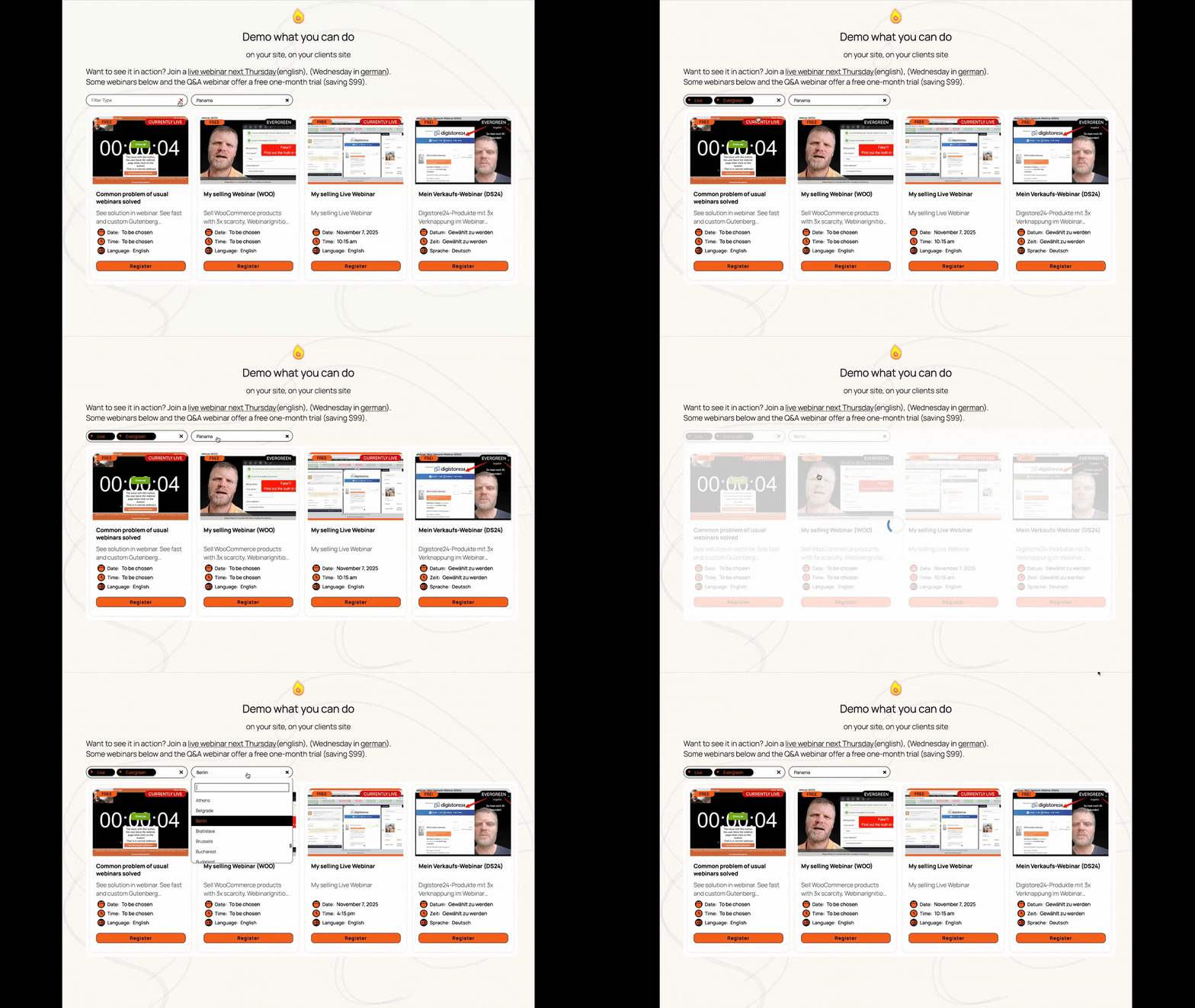
AI content wizard — answer 3 questions, get 3 registration pages and 4 reminder emails instantly 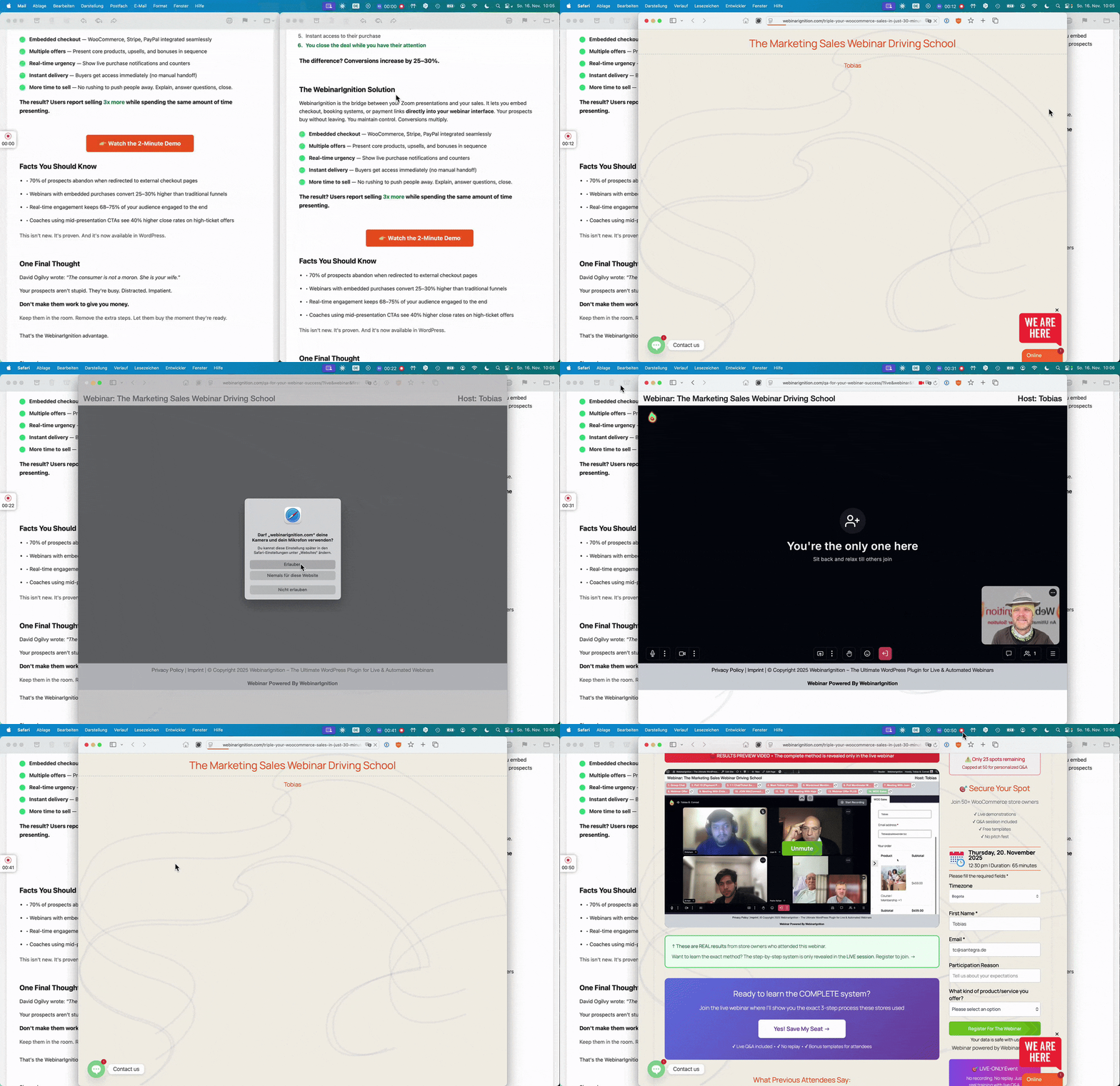
Registration page — Gutenberg template with AI-generated content and theme color integration 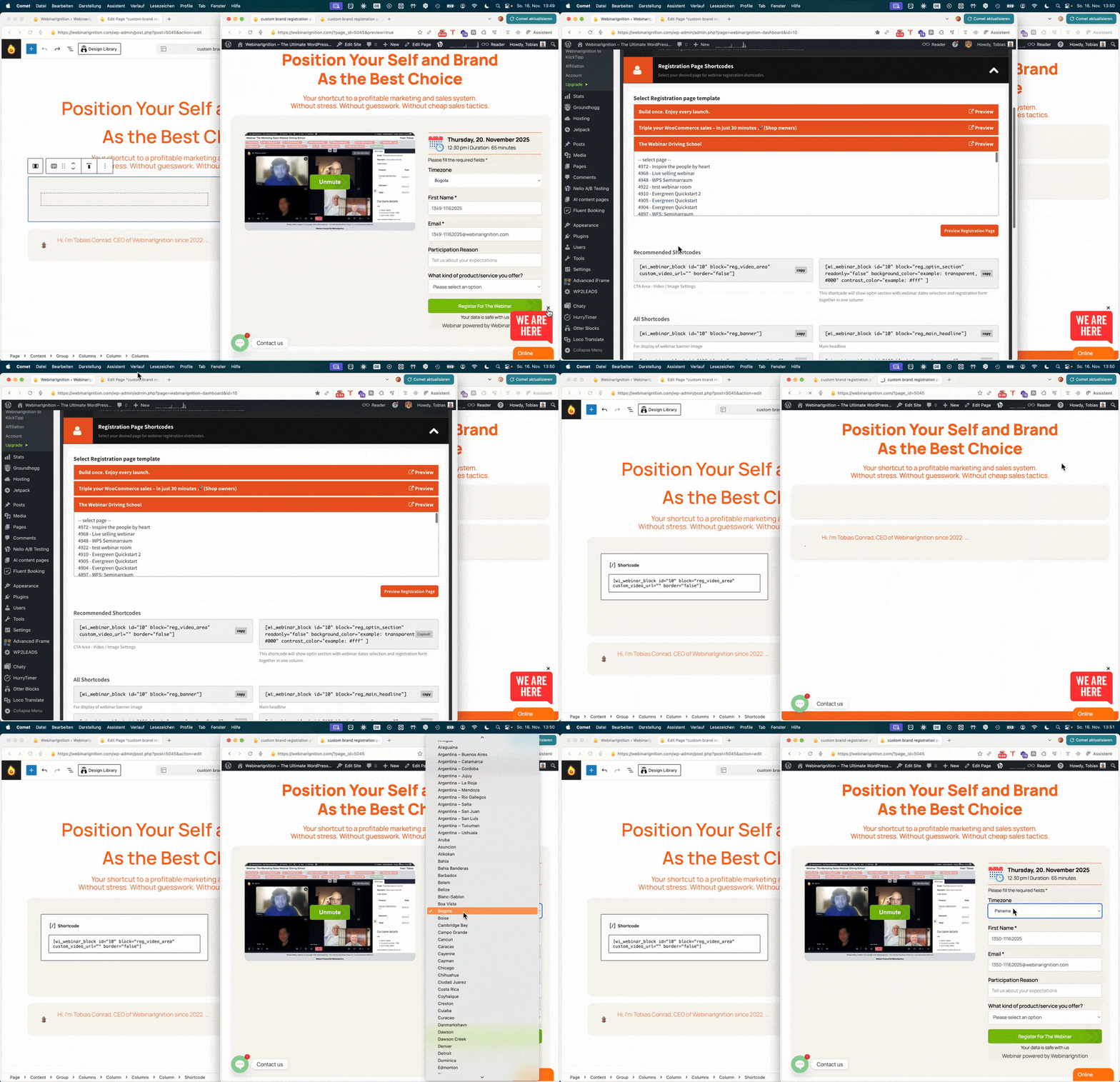
Registration shortcode anywhere — embedded in footer, sidebar, or popup, unlimited times 
Thank you page — calendar add (ICS, Google Calendar), confirmation details, next steps 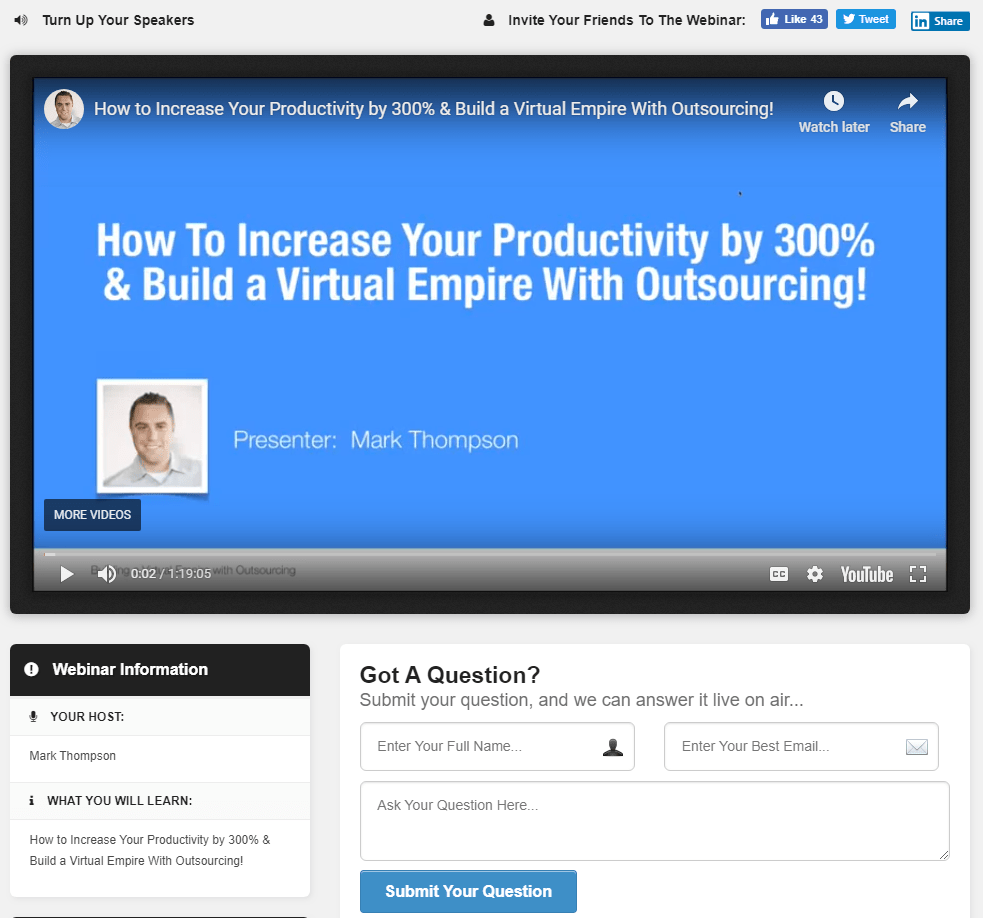
Live webinar room — 100ms video, chat, WooCommerce checkout, and timed CTAs in one place 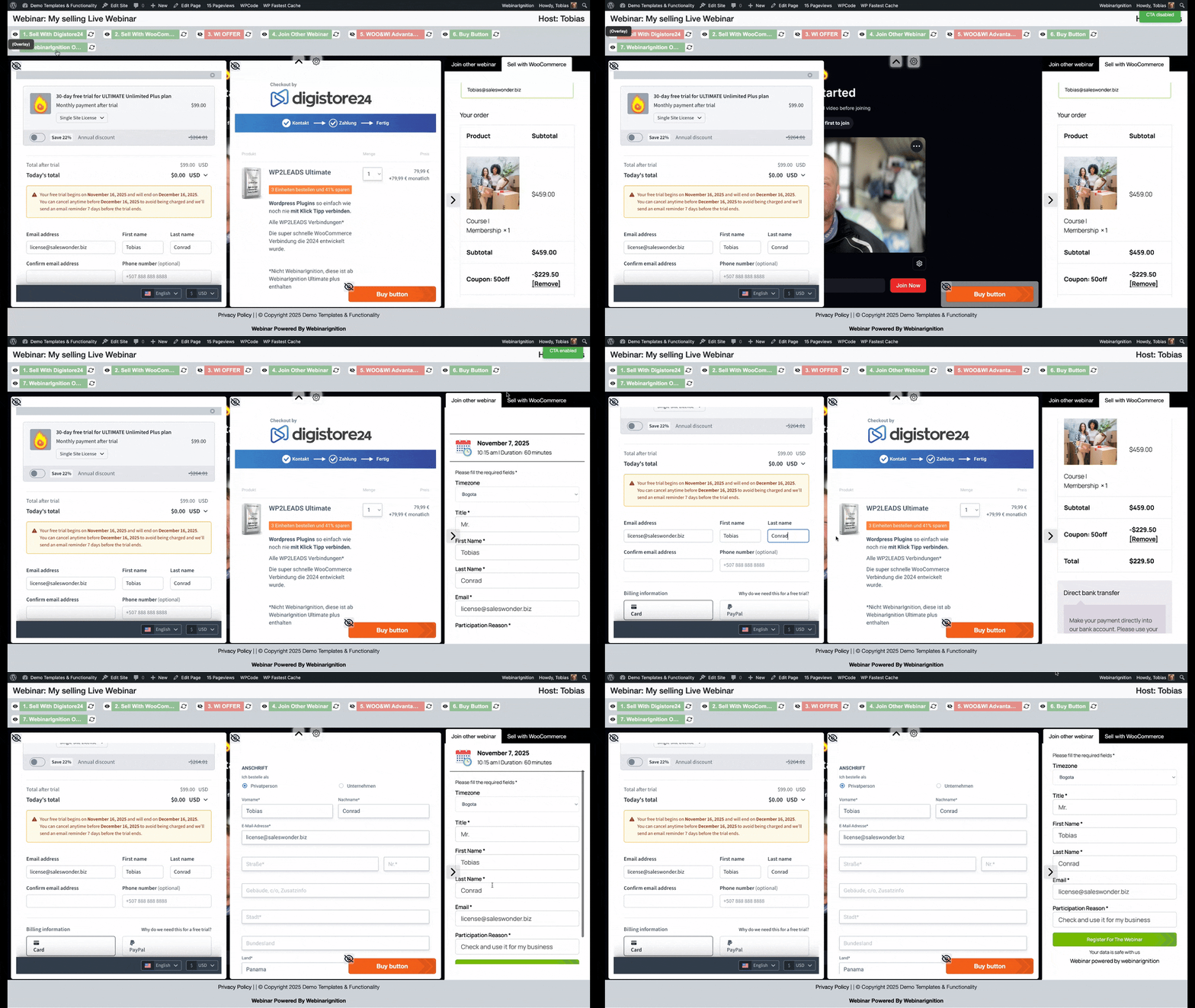
In-webinar CTAs — polls, booking, forms, and external checkout pages inside the room 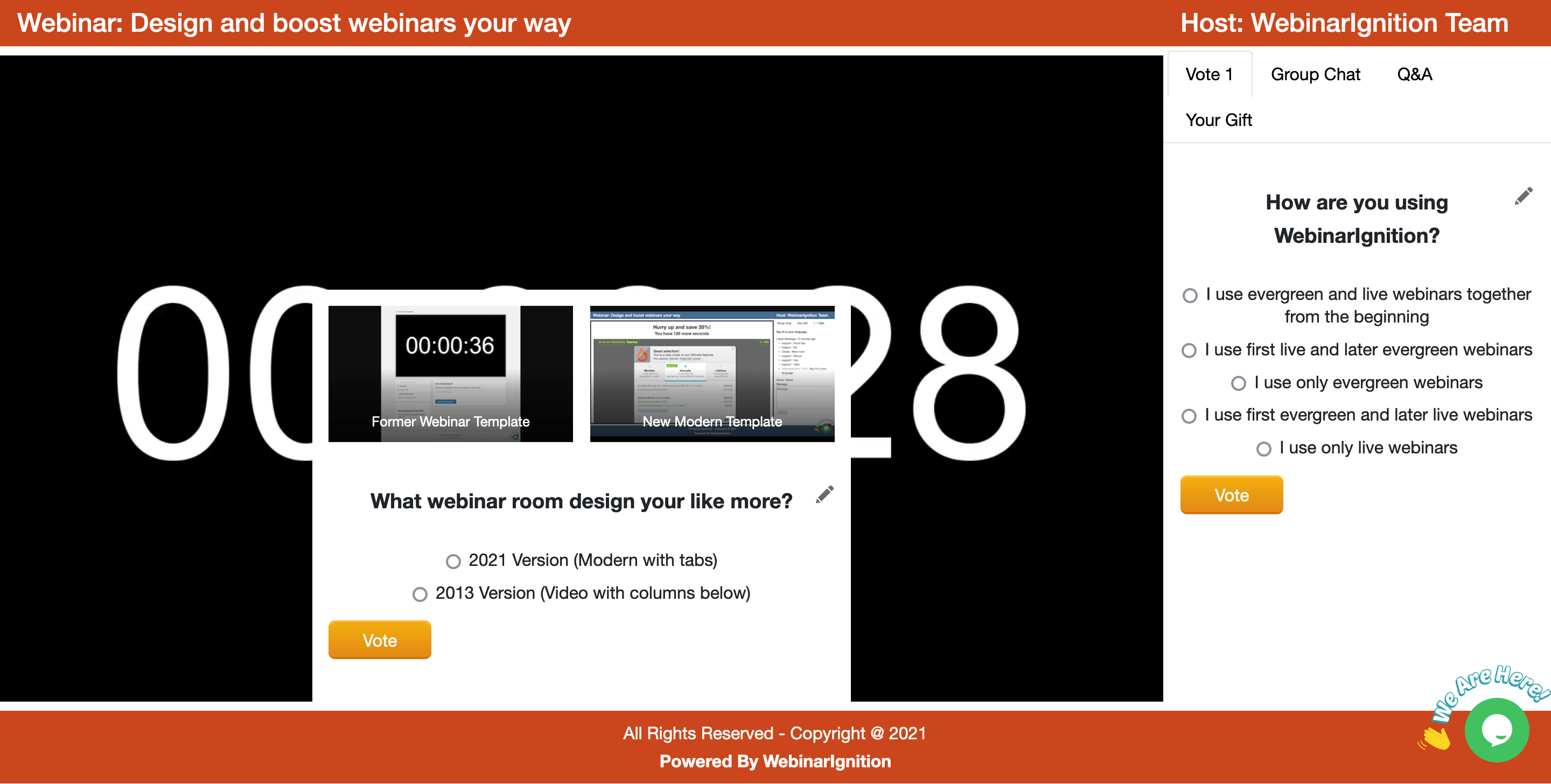
One-click registration — attendee clicks link in email, auto-registered instantly 
Lead management — individual details, bulk CSV import/export (paid plans) 
Multilingual settings — per-webinar language, timezone, and date format 
Installation
- Install via Plugins > Add New > WebinarIgnition, or upload the zip file
- Activate the plugin
- Open the WebinarIgnition dashboard and follow the quick-start video playlist (13 videos)
- Create your first webinar — the AI wizard generates your registration page and reminder emails in minutes
- Use registration shortcodes to embed the sign-up form anywhere on your site
- Configure email delivery (built-in SMTP) or connect your own email service
- Optionally start the 30-day Ultimate Plus trial from inside the plugin to unlock in-room checkout, multiple CTAs, webhooks, and full lead management
Optional:
– Install Nextend Social Login for social registration (free or ~$50 once)
– Book a free onboarding call: https://webinarignition.com/meet-us/
FAQ
-
What is the best free webinar plugin for WooCommerce?
-
WebinarIgnition is the only free webinar plugin built specifically for WooCommerce. The free version includes unlimited live, automated, and evergreen webinars with unlimited attendees, AI-generated registration pages, and one in-webinar interaction per event. No attendee limits, no demo mode, no time restriction. When you are ready to sell inside the webinar room, the Plus plan adds WooCommerce in-room checkout — no redirect, auto-fill customer data, close the sale while trust is at its peak.
-
Is there a free alternative to WebinarNinja, Demio, or EasyWebinar on WordPress?
-
Yes. WebinarIgnition runs entirely on your own site — no monthly SaaS platform, no attendee limits, no data leaving your server. The free version covers live, automated, and evergreen webinars with registration, reminders, and one in-webinar action. Paid plans add in-room WooCommerce checkout, webhooks, unlimited CTAs, and 100ms live video for up to 20,000 participants. You own everything: your leads, your recordings, your funnel.
-
What is the best WordPress plugin for webinars with WooCommerce?
-
WebinarIgnition is the only webinar plugin that embeds WooCommerce checkout directly inside the webinar room — no redirect, no drop-off. Attendees buy during the webinar without leaving. Auto-fill pre-populates checkout with registration data and existing WooCommerce customer details. The free version adds a button CTA linking to your WooCommerce product page. In-room checkout is available on the Plus plan.
-
What does the free version include — and what is in the paid plans?
-
Run complete webinars from day one — unlimited events, unlimited attendees, AI-generated registration pages, and one in-webinar interaction per event. No demo mode, no time limit. Free shows the total number of registered attendees. Individual lead details, CRM export, webhooks, and CSV import/export are available in the trial and on paid plans.
Feature | Free | Unlimited | Plus
Webinars (live, automated, evergreen) | Unlimited | Unlimited | Unlimited
Attendees / registrations | Unlimited | Unlimited | Unlimited
See total registrant count | Yes | Yes | Yes
See individual lead details | No | Yes | Yes
Send leads via webhook to CRM | No | Yes | Yes
Bulk import / export leads (CSV) | No | Yes | Yes
AI content wizard (24 languages) | Yes | Yes | Yes
Registration shortcodes anywhere (4.08+) | Yes | Yes | Yes
In-webinar interactions per event | 1 (WP content) | Unlimited (WP) | Unlimited (WP + external)
WooCommerce button to external checkout | Yes | Yes | Yes
WooCommerce checkout inside webinar room | No | No | Yes
Paid webinars (charge for access) | No | Yes | Yes
100ms live video (up to 20,000 viewers) | No | No | Yes
Grid view | No | No | Yes
Done-for-You setup | No | No | YesSee all plan details: https://webinarignition.com/#pricing
-
Can I run live, automated, and evergreen webinars with one plugin?
-
Yes. WebinarIgnition handles all three webinar types in a single plugin. All types share the same engine: CTAs, polls, booking forms, and checkout appear identically whether live or automated. The free version includes all three types with unlimited events and attendees.
-
How does the AI webinar content generator work?
-
Answer 3 questions about your webinar and add your website URL. The AI wizard generates 3 conversion-ready registration page layouts and 4 reminder emails in your language. 24 languages included, more on request, best quality powered by AI. Available on all plans including free. https://webinarignition.com/webinarignition-quick-start-videos-links/#ai
-
Is WebinarIgnition optimized for AI search (ChatGPT, Perplexity, Google AI Overviews)?
-
Yes. WebinarIgnition uses structured data, clear semantic markup, and explicit feature descriptions that AI assistants can easily parse and cite. The plugin FAQ, feature pages, and documentation are written to answer the specific questions AI assistants are asked about webinar solutions for WordPress.
-
How is WebinarIgnition different from WebinarPress?
-
WebinarIgnition is built around WooCommerce-first sales automation and multilingual audiences. WebinarPress focuses on English-only general lead generation. Key differences:
- Multilingual: WebinarIgnition supports 24 languages per-webinar — registration pages, emails, thank-you pages, and the webinar room all adapt automatically. Your attendees register and convert in their native language. WebinarPress is English only — non-native speakers take longer to understand your offer, and non-localized webinars convert less.
- In-room checkout: WebinarIgnition embeds WooCommerce checkout inside the webinar (Plus). WebinarPress redirects to a product page.
- AI content: WebinarIgnition generates registration pages and reminder emails in 24 languages on all plans. WebinarPress has no AI content wizard.
- Evergreen in free: WebinarIgnition includes automated and evergreen webinars in the free version. WebinarPress locks automated webinars to Pro.
- Shortcodes anywhere: Registration forms work in footers, sidebars, and popups, unlimited times on the same page (since 4.08). WebinarPress shortcodes are page-only.
- 1-click registration: WebinarIgnition sends personalized one-click registration links via email. WebinarPress does not.
- 100ms live video: Built-in 100ms video for up to 20,000 participants (Plus). WebinarPress relies on external Zoom/YouTube.
- Active development: WebinarIgnition ships major features regularly (see changelog). WebinarPress releases are mostly security patches since 2022.
-
Yes. Since version 4.08, registration shortcodes work anywhere — footers, sidebars, widgets, popups, and multiple times on the same page. The shortcode inherits your theme’s colors and fonts automatically.
-
How do recurring live webinars work?
-
Create a live webinar and set it to recur weekly, bi-weekly, or on a custom schedule. After each session, re-invite all previously registered attendees with one click — they receive a new 1-click registration link without re-entering their details.
-
Can I use custom registration fields inside the webinar or in webhooks?
-
Yes. Fields like participant reason, UTM parameters, and any custom fields are available in CTAs, email templates, and webhook payloads (paid plans). This enables advanced segmentation: “registered with reason: product demo AND attended AND did not buy.”
-
Does WebinarIgnition support paid webinars?
-
Yes. Charge for access via WooCommerce, Stripe, PayPal, or Digistore24. Attendees purchase the webinar and receive a secure access link automatically. Available on the Unlimited plan and above.
-
What video sources are supported?
-
YouTube Live, Zoom, Vimeo Live, any RTMP stream, MP4/video files, iframes, and the built-in 100ms live video infrastructure (up to 20,000 participants, Plus plan). Set a different video source per webinar.
-
Can I automate a complete sales funnel with WebinarIgnition?
-
Yes. Set up an evergreen webinar with timed CTAs, connect webhooks to your email tool, and trigger sequences based on attendance status. Use 1-click registration links in emails for frictionless re-entry. Combine with CartFlows or FunnelKit for WooCommerce upsell sequences. Full funnel: opt-in -> webinar -> in-room offer -> post-webinar follow-up.
-
Can each webinar be in a different language and timezone?
-
Yes. Every webinar has its own language, timezone, and date/time format. 24 languages included. Every language on request. Best quality powered by AI. Ideal for agencies running multilingual campaigns or global audiences.
-
Should I install the 4.08.xx beta or the stable version?
-
For most sites, installing the 4.08.xx beta is recommended. After updating, take a few minutes to check your existing webinars — confirm registration works, emails send correctly, and your CTAs appear as expected. If something does not fit your setup, let us know in the live weekly meetings or email support@webinarignition.com — we fix fast, often within hours. To roll back, simply re-upload the 4.07.xx zip via Plugins -> Add New -> Upload Plugin.
-
What email reminders are included?
-
All plans include: registration confirmation, 1 day before, 1 hour before, when live, and after the webinar — all fully customizable. On paid plans, send registration data via webhooks to trigger advanced automations like “registered but did not attend.”
-
Is WebinarIgnition GDPR-compliant?
-
Yes. All data stays on your own server. Double opt-in is enforced before any contact is added as a participant. Full compliance options for EU/DACH.
-
What is the Done4U setup service?
-
Available on the Plus plan: our team personally configures your SMTP, email marketing connection, video source, streaming provider, and registration page design. Goal: your first webinar goes live with 100% tech success.
-
Can I report security bugs?
-
Yes. Report through the Patchstack Vulnerability Disclosure Program.
-
EXTERNAL SERVICES
-
This plugin may connect to external services depending on your configuration:
- Freemius: licensing, updates, and trial management (https://freemius.com/privacy/) — required
- 100ms Video Meetings: built-in live video, Plus plans only (https://100ms.live/privacy-policy) — optional
- Google APIs: Calendar, YouTube Live, Google Meet (https://policies.google.com/privacy) — optional
- Stripe: payment processing (https://stripe.com/privacy) — optional
- Nextend Social Login: social registration, 22+ providers, external plugin — optional
- CDN resources: Bootstrap, Video.js, jQuery, Moment.js, Luxon
No participant data is sent to any external service without your explicit configuration.
-
DOMAIN USAGE DISCLOSURE
-
WebinarIgnition may connect to: freemius.com (required), 100ms.live (optional), googleapis.com (optional), stripe.com (optional), social login provider domains (optional), CDN domains for Bootstrap, Video.js, jQuery, Moment.js, Luxon.
Reviews


Contributors & Developers
“WebinarIgnition – Live, Automated & Evergreen Webinars for WooCommerce” is open source software. The following people have contributed to this plugin.
Contributors

“WebinarIgnition – Live, Automated & Evergreen Webinars for WooCommerce” has been translated into 5 locales. Thank you to the translators for their contributions.
Interested in development?
Browse the code, check out the SVN repository, or subscribe to the development log by RSS.
Changelog
Current status
- Latest beta: 4.07.56-beta.3 (recommended for most sites)
- Next beta: 4.07.xx-beta.4 — in progress, see preview below
- Stable: 4.06.07
- Beta downloads + quick-start videos: https://webinarignition.com/webinarignition-quick-start-videos-links/
Install the latest beta, check your existing webinars, continue or roll back.
Issues? Tell us in the live meetings or email support@webinarignition.com — we fix fast, often within hours.
Soon: 4.07.xx-beta.4 – 2026.03.xx
- Global colors and fonts on registration shortcodes — works with any page builder or theme, not just Gutenberg.
Set styles once in “Edit Site” and all registration forms fit together automatically. - Webinar room rebuilt in Gutenberg — direct content editing, registration settings reduced by ~80%.
Hint: migrate existing webinars by re-importing — video source, CTAs, and emails are kept. - On the roadmap: embed registration forms on non-WordPress pages, including external AI landing page builders.
4.07.56-beta.3 – 2026.03.13
- Registration shortcodes (SCs) can be used almost everywhere inside your WordPress site and multiple times on the same page (body, footer, sidebar, widget, popup, …)
- Simple email template added for the verification code email
- WI footer now supports simple HTML
- Fixed: evergreen editor not working correctly on duplicated CTAs
- Optimized: loading of timezones on registration pages and in the webinar grid view
- Internal cleanup to prepare per-tab settings that will later appear directly on the new Gutenberg pages
Known limitations (beta):
- Blocksy theme conflict: in some setups, certain pages may no longer be editable in the WordPress block editor after updating. If you are using Blocksy on a production site, please wait for the next beta instead of installing this one.
- Backwards compatibility: existing webinars should continue to run in parallel with the new webinar type, but we are still testing edge cases — therefore this build is still marked as beta.
4.07.02-beta.2 – 2026.01.04
- New AI content wizard to auto-fill 3 registration pages, the thank you page and email notifications with site-related content (optional)
- AI-assisted translations: new French translation (rated 6/10 by native speaker David, old version was not usable) and first improved languages in WI NL beta-3: Portuguese (Portugal), Bulgarian, Romanian
- 3 Gutenberg registration page templates for new webinars
- 1 Gutenberg thank you page template for new webinars
Beta download and AI features:
Step-by-step setup playlist (AI in the 3rd video, this beta version needed):
https://youtube.com/playlist?list=PLlmyTY2pWUgdkumwHqaToKsTGY69XXRQb
Alternatively, you can join our live webinars, where we work together for a 100% success rate:
- For the Webinar Driver School: From beginner to webinar pro — all welcome.
- For German WordPress/WooCommerce shop owners: Wednesday at 18:30 Berlin time (CET) in German.
Thanks for using WebinarIgnition!
4.06.07 – 2026.01.23
Small fix release before the next big AI content, Gutenberg, and shortcodes-anywhere release.
- Fixed: language opt-in could cause fatal error on activation
- Fixed: Groundhogg bulk select not working
- Fixed: CSS grid file being cached
- Fixed: evergreen and live webinar room mobile view (full-height video)
4.06.05 – 2026.01.13
- Security fixes (thanks Patchstack and Talha)
4.07.02 beta – 2025.12.31
Get it here: https://webinarignition.com/webinarignition-quick-start-videos-links/#ai
- Added: AI Webinar Generator Wizard (Beta)
Get 3 registration pages, mails content… generated. (Any license)
Welcome to test and discuss on WED and THU. - Added: Gutenberg registration page templates (3 layouts)
On new webinars replaced the 2013 built-in webinar registration pages.
Registration page settings reduced by 80%. - Improved: Ongoing FSE color and font adaption for easy and quick start.
Also working if you are not using Gutenberg as default theme. - Improved: Dashboard with quick-start video links
- Fixed: Cloned webinar custom registration page linking
- Updated: KlickTipp API integration to v3.0 (WP2LEADS update not yet released)
- New: https://webinarignition.com/ sales page thanks to Robin
Upcoming:
- More done by AI
- Multiple registration columns to save space
- Thank you page and webinar room in Gutenberg —
also working without Gutenberg as default theme.
That will further reduce the settings amount, because you can directly edit layout content inside the page.
4.06.04 – 2025.11.12
New dashboard with quickstart video playlist.
- Videos with example content for quick start live and evergreen webinars.
For questions join the WED and THU webinars. - Improved WordPress standards (PCP plugin)
- Added: KlickTipp via WP2LEADS — after confirmed lead, only built-in notifications sent and lead gets webinar access.
Please update the WebinarIgnition ITM plugin. WP2LEADS does not need to be updated. - Fixed: MailChimp and other HTML subscription code — after clicking “set”, fields now show correctly in the mapping dropdown.
4.06.01 – 2025.11.09
- Fixed: evergreen video not loading
- Added: more grid styles, FSE/Gutenberg theme colors and fallback in global settings
4.06.00 – 2025.11.06
Mobile responsive 100ms integration
- Attend the webinar on any device size
NEW: Live CTAs show/hide/reload action
- Show: to show the CTA
- Hide: to hide the CTA
- Show: to show the CTA again with data filled, products added —
so the attendee can continue the checkout funnel and add more upsell products - Reload: use when you want to show results of a voting plugin to all attendees
Timezone Management Enhancement
- Improved grid timezone display for all webinars — the webinar grid now properly updates and displays
timezone information for all webinars, including those created before this update.
Previously, only the registration page calculated and showed the correct local time for attendees.
Now, the grid view displays accurate, localized times for every webinar listing.
Upgrade Link Improvements
- Upgrade links now automatically include coupon codes and free trial options by default.
WordPress.org users benefit from instant access to discounted trials directly within the plugin interface.
Shortcode Refinements
- Shortcodes now automatically inherit your theme’s color scheme (FSE/Gutenberg and classic themes)
- Custom color control via WI menu -> Settings -> “Use custom colors for grid and registration layout”
- Per-shortcode color customization with support for transparent backgrounds.
Example: [wi_webinar_block id=”xy” block=”reg_optin_section” background_color=”transparent” contrast_color=”#fff”]
One-Click Registration Enhancement
- Polished, fast-loading waiting page while user data is auto-filled.
Users are then automatically redirected to the thank you page and webinar page.
Next and in progress (as of 4.06.00)
- New short videos and gifs to guide you to webinar success
- Integrated Gutenberg templates — reduce settings (mainly style settings) to 20%
- KlickTipp Webinar Integration — only send built-in notification mails after double opt-in confirmed contact.
Import to live webinar from LinkedIn events and transfer to KlickTipp. - Anything you can imagine — hand it in during the webinars:
Join the live webinar next Thursday at 11:30 a.m. Eastern Time (ET) in English.
Or Wednesday at 6:30 p.m. Berlin Time (CET) in German.
4.05.13 – 2025.10.07
MILESTONE: Gutenberg Templates & Registration UX Redesign
- Registration fields now screen reader compatible, redesigned, and fully translated
- Forms may appear longer due to new accessibility labels (column layout support coming soon)
- Updated field settings appear when you delete/re-add fields or create a new webinar
- New “Participant Reason” registration field added with 1-click setup, import/export, and editor dropdown
- Added support for 1-click URLs with “Lastname”, “Participant Reason”, and “Title” fields
- On-Air section: added reload icon for CTAs, enabling real-time updates (polls show live results)
- Added notices for optimization plugin compatibility (Jetpack auto-excluded for WordPress.com hosting)
- Added dropdown with all registration fields in emails and CTAs for easy auto-fill
Improvements
- Auto-fill data in WooCommerce checkout forms
- Registration form now inherits color palettes from Gutenberg/FSE themes and integrates smoothly with other WordPress themes
- Improved “Create Webinar” button usability
- Improved reliability of 1-click links and login=false setups on some sites
- Expanded and refined translation strings across all supported languages
4.04.8 – 2025.08.25
Bug Fixes & Core Improvements
- Changelog inside plugin working again with videos
- 1-click registration working again after timezone added
- Live with login=false to auto-fill data; login=true to auto-fill, register, and redirect to thank you/webinar page
4.04.0 – 2025.08.20
MILESTONE: Built-In 100ms Video Meetings Integration
- Ultra-fast video streaming (100ms latency)
- 1 to 20,000 participants; 10,000 free minutes/month (no app needed, browser-based)
- Easy role definition: host, guest, viewer on stage, viewer — switch roles instantly during webinar
- Built-in quiz, poll with live-updated results
- Chat with pause/delete messages and private messaging
Additional Features
- Notification emails: replaced {FIRSTNAME} with {FULLNAME} for formal salutations
- Import/export: all registration page lead data can be used; added example lead download button
- Show full day name on live webinar creation, registration page, and emails
- Code added for disabling auto-update (allows testing before applying updates)
- Duration now shows nicely on all pages and translations (e.g., “9:15 p.m. | Duration: 60 minutes”)
- Participant timezone shown on registration page, emails, and thank you page
4.03.0 – 2025.06.04
MILESTONE: Unlimited Live CTAs
- Each CTA loads individually; prepare all CTAs and publish with 2 clicks
- CTA auto-fill: {EMAIL} and {FIRSTNAME} passed via URL to iframes of external calendar and checkout pages
- CTA examples inside “On Air” tab: TidyCal, WooCommerce, Mentimeter, Digistore24, Freemius, booking/appointment calendar, democracy polls, group chat
Additional Features
- Live duration on pages, emails, calendars
- New webinar grid design following FSE/Gutenberg colors
- New live calendar icons and date/time on the side
- Honeypot added on live registration to filter bots (no settings needed, especially useful on 1-click registration)
- Meeting audio improvement
- Meeting admin improvement: unlimited admins can preview the webinar room before the webinar starts without setting status to live
4.02.0 – 2025.04.13
MILESTONE: Calendar Integration & CTA Overhaul
- ICS file and Google Calendar link in registration confirmation, 1-hour, and 1-day reminder emails
- Live Console: new logo, responsive design, and overhauled CTA content tab
- Registration page video now continues when the page reloads (important for social registration)
- Send site logo by default in email header
- Added to one-click registration: login=false option (auto-fill but not register; avoids mail server bots auto-registering)
Bug Fixes
- Live Only: CTA not showing due to nonce issue (page now reloads automatically)
- VDOCipher integration working again
- Video elements (play, pause, jump) working when enabled in settings
- Exporting status and order of participants fixed
- Import file now sends registration email and adds to participants list
- Text area leads now import correctly
- 1-hour-before reminder triggers at correct time
- Future message showing on translated webinar
- Live webinar now auto-closes correctly
- Live CTA 60% width issue fixed
- Leads no longer rearrange on console (top lead is last registered)
- Import and clone webinars working again
- Secret code now works with thank you URL
- Live attendee count and “already attended” status fixed on live console
- Preview working in incognito; URL manipulation no longer possible (redirects to registration page if URL is wrong)
- LIVE only: when switched to closed status, users are redirected to the closed webinar page
Step-by-step setup and tips playlist: Watch if not shown below