

Description
Take complete control of your WordPress login experience! Sky Login Redirect is the most flexible and powerful login/logout redirect plugin for WordPress, trusted by thousands of sites worldwide.
🎯 Why Choose Sky Login Redirect?
Perfect for:
✓ Membership sites that need role-based redirects
✓ WooCommerce stores wanting seamless checkout flows
✓ Multi-author blogs with custom dashboards
✓ Client sites requiring branded login pages
✓ Any site wanting better user experience
🚀 Core Features (FREE)
Smart Redirects
* Redirect users to previous page they were viewing
* Set redirects by user role (Admin, Editor, Subscriber, etc.)
* Target specific users with custom redirects
* Global redirects for all users
* Separate login and logout redirect rules
* Automatic loop detection prevents infinite redirects
Login Page Customizer
* Custom logo upload
* Background color or image
* Form styling (colors, borders, padding)
* Button customization (colors, size, alignment)
* Live preview of changes
* No coding required!
WooCommerce Integration (Enhanced in v4.1)
* Preserves cart/checkout redirects automatically
* Smart My Account endpoint handling
* Prevents redirect loops on customer-logout
* Shop page fallback on logout
Performance & Security
* Built with modern PHP 8.1+ architecture
* AJAX-powered admin interface
* Rate limiting on AJAX endpoints
* Dual-layer caching for speed
* 40-60% faster than previous versions
⚡ Technical Excellence
- Modern codebase: Enums, readonly classes, strict types
- Enterprise-grade security: Rate limiting, output escaping, nonce verification
- Optimized performance: Object caching, transients, minimal database queries
- Developer-friendly: Debug logging, extensible architecture, clean code
Important: Version 4.1.0 requires PHP 8.1 or higher for modern features and enhanced security.
💎 Pro Features
Upgrade to Sky Login Redirect Pro for advanced functionality:
Advanced Redirects
* More granular redirect rules
* Easy Digital Downloads integration
* Advanced WooCommerce customization
* Conditional logic for redirects
Content Restriction
* Restrict pages/posts to logged-in users
* Role-based content access control
* Redirect non-authorized users
Shortcodes & Widgets
* [slr_login_form] – Embed login form anywhere
* [slr_login_link] – Custom login/logout links
* Automatic menu integration
* Modal login form with customizer
Enhanced Customization
* WooCommerce My Account page styling
* Custom CSS editor
* Additional UX/UI options
* Advanced form styling
Priority Support
* Direct developer access
* Faster response times
* Custom feature requests considered
Screenshots

Login and logout redirection rules for roles, specific users or all users. You can redirect to the previous page, to a custom page, or use the WordPress default. 
The page customizer allows you to customize the logo and the page background (color or background image) 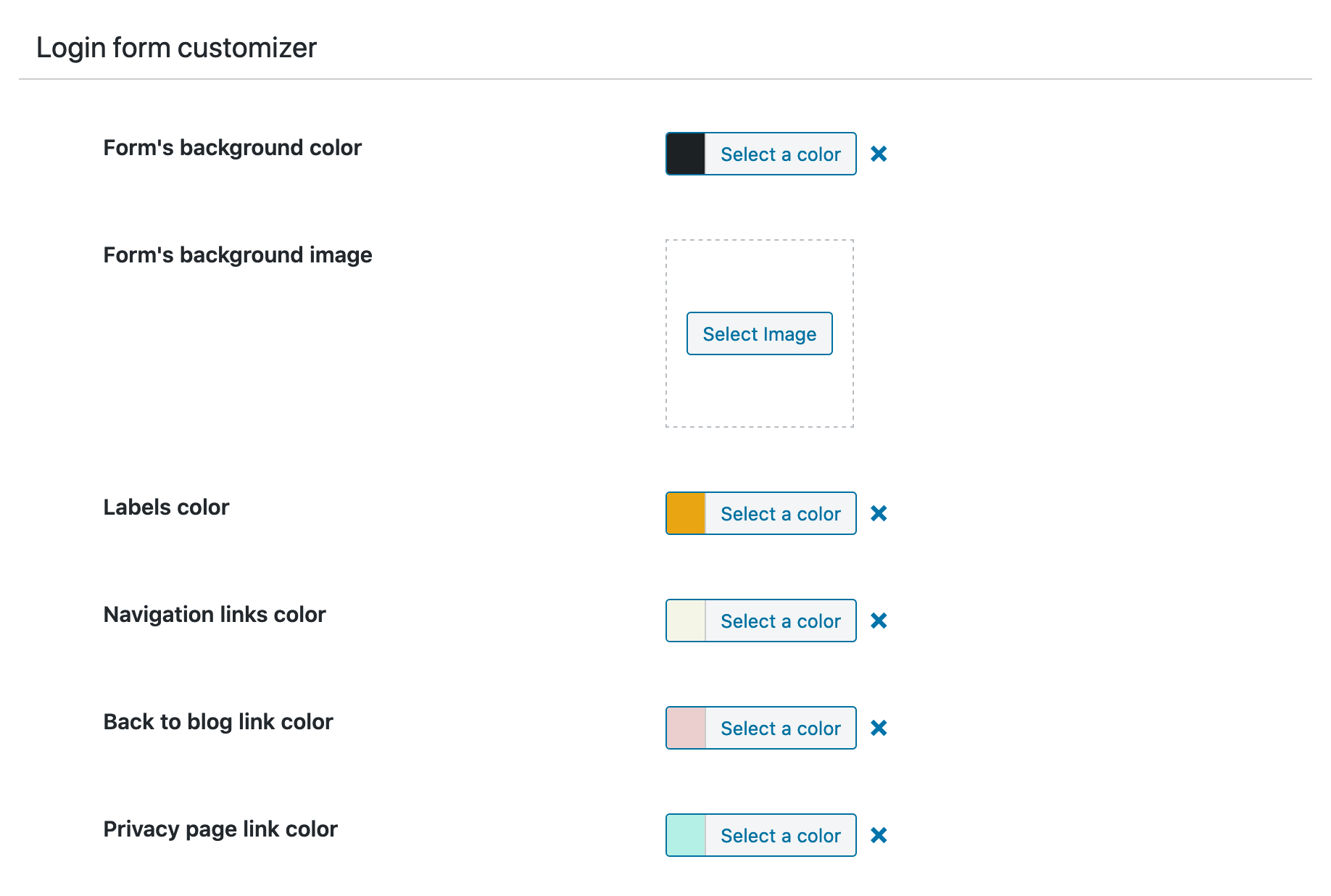
The form customizer allows you to customize the login form. 
The submit button customizer allows you to customize the login submit button.
Installation
- Install the plugin.
- Activate the plugin through the ‘Plugins’ menu in WordPress.
- Visit the ‘Login Redirect’ settings page to set your login and logout redirects or edit your login page’s styles.
FAQ
-
How do I set up redirects?
-
- Go to Settings Login Redirect in your WordPress admin
- Choose your redirect type (Previous Page, Custom Page, or WordPress Default)
- Select which users/roles the redirect applies to
- Save changes and test!
-
Can I redirect different user roles to different pages?
-
Yes! You can set unique redirects for each user role (Administrator, Editor, Author, Subscriber, etc.) and even target specific users by username.
-
Does it work with WooCommerce?
-
Absolutely! Version 4.1.0 includes enhanced WooCommerce integration:
* Preserves cart/checkout redirects automatically
* Smart My Account endpoint handling
* Customizable logout redirects
* No conflicts with WooCommerce login flow -
Will it work with my membership plugin?
-
Yes! Sky Login Redirect is compatible with most membership plugins including MemberPress, Restrict Content Pro, Paid Memberships Pro, and others.
-
Redirections don’t seem to trigger – what should I do?
-
- Verify redirect rules are saved in Settings Login Redirect
- Clear your browser cache and cookies
- Re-save permalinks: Settings Permalinks Save Changes
- If using WooCommerce, re-save WooCommerce settings
- Check for plugin conflicts by temporarily disabling other plugins
-
Can I redirect users back to the page they were viewing?
-
Yes! Select “Previous Page” as your redirect option. The plugin intelligently tracks the last page visited and redirects users there after login.
-
Does it support custom login pages?
-
Yes! The plugin includes a visual login page customizer where you can:
* Upload custom logos
* Change colors and backgrounds
* Style forms and buttons
* Match your brand perfectly -
What’s new in version 4.1.0?
-
Version 4.1.0 brings major improvements:
* Modern PHP 8.1+ architecture for better performance
* Enhanced WooCommerce integration
* AJAX rate limiting for security
* Improved redirect loop detection
* Cleaner, more maintainable codebase -
Is it translation ready?
-
Yes! The plugin is fully translation-ready and includes a .pot file for translators.
-
Where can I get support?
-
Free support is available through the WordPress.org support forum. Pro users get priority email support.
Reviews


Contributors & Developers
“Sky Login Redirect” is open source software. The following people have contributed to this plugin.
Contributors
Translate “Sky Login Redirect” into your language.
Interested in development?
Browse the code, check out the SVN repository, or subscribe to the development log by RSS.
Changelog
4.1.9 – 2026-03-30
- Performance – Carbon Fields no longer loads on frontend, saving ~5-15 ms PHP time and ~1-2 MB memory per public page load
- Performance – Freemius SDK no longer initialises on frontend — all plan checks are strictly admin-only
- Performance – Premium widget rewritten as plain WP_Widget, removing CF boot requirement on every widgets_init call
- Performance – Removed redundant get_cached_options() hook on save — cache repopulates lazily
- Bug Fix – Cookies were not cleared on logout due to sanitize_key() stripping uppercase from cookie names
- Bug Fix – CSS value 0 was silently ignored in the login customizer (border-radius: 0, border-width: 0, etc.)
- Security – Open redirect hardening: custom redirect URLs now validated with wp_validate_redirect() in addition to esc_url_raw()
- Resilience – Server-side redirect_to hidden field injection for compatibility with security plugins (WPS Limit Login, etc.)
- Resilience – login_redirect and logout_redirect filter priorities raised to PHP_INT_MAX
- Resilience – Cookie-based fallback in redirect logic when redirect_to is stripped by security plugins
- Internal – Login customizer hook moved from carbon_fields_register_fields to after_setup_theme
- Internal – carbonade() replaces carbon_get_theme_option() in RedirectManager for frontend compatibility
- Internal – Freemius helper renamed to snake_case, uninstall hook and premium loader gated to is_admin()
4.1.8 – 2026-03-24
- Security – add wp_strip_all_tags() defense-in-depth to all inline CSS outputs (login customizer, WooCommerce customizer, modal customizer, custom CSS blocks, code CSS)
- Security – remove Select2 library and custom AJAX search system entirely — Carbon Fields handles selects natively
- Performance – remove update_option() from read path in get_cached_options() (VIP compatibility)
- Performance – carbonade() now reads from object cache / transient two-tier cache instead of direct get_option() DB query
- Performance – modal login form no longer renders HTML or generates nonces for logged-in users
- Performance – modal AJAX login script only enqueues for logged-out users via reliable template_redirect check
- Performance – flush all cache layers (object cache + transient) on Carbon Fields settings save with correct priority ordering
- Compatibility – patch Carbon Fields Pimple container for PHP 8.5: replace deprecated SplObjectStorage::attach()/detach() with offsetSet()/offsetUnset()
- Refactor – split modal ModalLoginManager::initAjaxLogin() into registerAjaxHandler() (init) and enqueueLoginScripts() (template_redirect) for proper separation of concerns
Older versions changes can be found in the changelog