

Description
ShopPress is a shop builder that works with WooCommerce and Elementor. Design store pages (shop, product, cart, checkout, my account) and product loops using drag-and-drop widgets, without relying on default WooCommerce layouts.
🎙️ Introduction
💻 Demo
📃 Documentation
The plugin includes over 110 widgets for product loops, single product, cart, checkout, wishlist, compare, and more. You can use product loop templates for sales, top-rated, best-selling, or custom queries.
✨ Styler
ShopPress includes a visual CSS editor (Styler) so you can adjust page elements without writing custom CSS. Changes can be previewed in real time.
✨ Free vs Pro
The free version includes builders for shop, product, cart, checkout, wishlist, compare, and product loops. A loop builder is included to design product grids and lists.
Free vs Pro Features
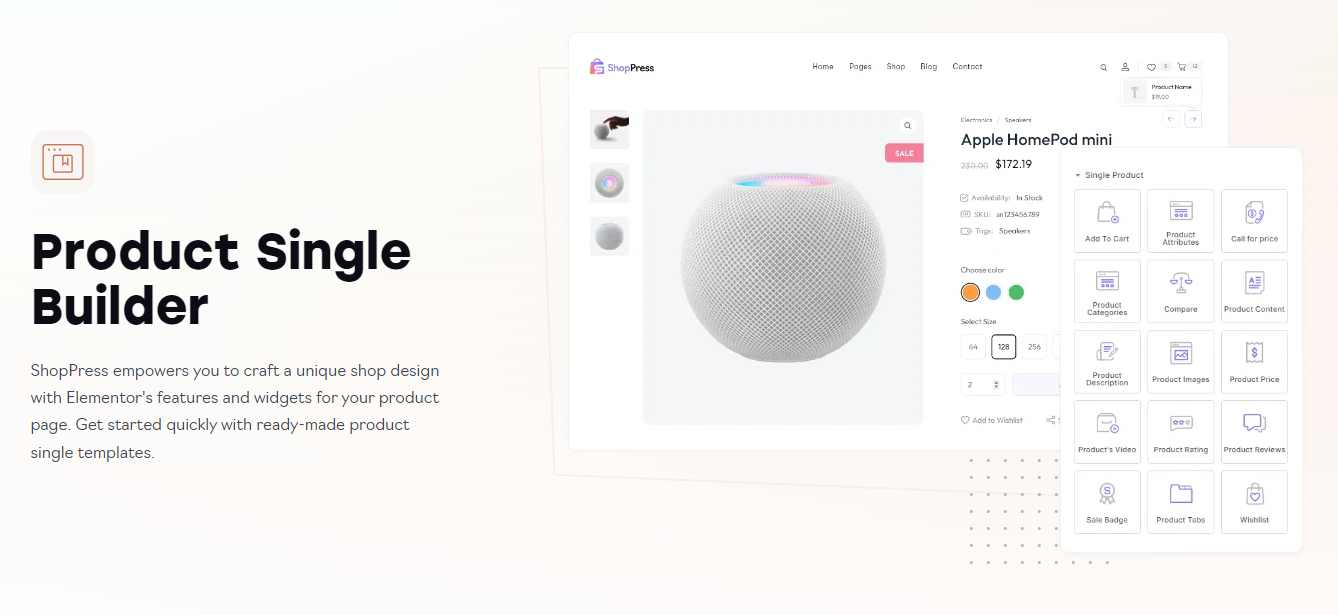
✨ Single Builder
Use around 20 widgets to build the single product page and control layout, images, price, add to cart, tabs, and related products.
✨ Shop page Builder
Customize the shop/archive page and product filters. Widgets let you control layout and add filtering for a better browsing experience.
✨ Compare Builder
Add a product comparison page so customers can compare several products in one place.
✨ Checkout Builder
Design the checkout page with Elementor. Customize layout and fields for a clear checkout experience.
✨ Cart Builder
Create a more beautiful card table for your website and experience more sales using the cross-sell widget. You can also customize the empty shopping cart message.
✨ Empty Cart Builder
Display a personalized and better view if the cart is empty. ShopPress WooCommerce builder will help you with this.
✨ Quick view Builder
Use ShopPress Quick view builder to create a beautiful look for the quick view of the products in your product lists.
✨ Wishlist Builder
Design your own wishlist page and let your users create a list of their favorite products. This will increase the number of orders your website receives.
✨ Thank You Page Builder
Display a beautiful Thank you message on the checkout page after purchase with the details your customers need.
✨ My account Builder
Redesign the WooCommerce My Account page. Separate builders are available for dashboard, orders, downloads, addresses, and account details.
✨ My account page builders
Account Details Builder
Addresses Builder
Downloads Builder
Orders Builder
Dashboard Builder
✨ Size Chart
If you are selling a product that you need to inform about its size, you can easily design a size chart fitting your website design.
✨ Sale Countdown
Sales notification feature allows you to display alerts about recent product sales on a beautiful pop-up. Visitors will see notifications about your latest sale and this helps you turn your visitors to customers.
✨ Loop Builder
Design your product loops from scratch with the details you want and need. You can create separate layouts and designs for each of the product loops. There is a separate builder for each product loop.
✨ Order tracking widget
Allow your customers to track their order using this widget. You can place it on any page built with Elementor.
✨ Custom add to cart widget (Pro)
Place an add to cart button for the desired product anywhere you want on your Elementor page.
✨ Features List
☉ Styler
☉ Product Single Builder
☉ Shop Page Builder
☉ Checkout Page Builder
☉ Archive Page Builder
☉ Shop Products Loop Builder
☉ Recent Products Loop Builder
☉ Related Products Loop Builder
☉ Sale Products Loop Builder
☉ Top Rated Products Loop Builder
☉ Best Selling Products Loop Builder
☉ Featured Products Loop Builder
☉ Cross-sell Loop Builder
☉ Up-sell Loop Builder
☉ My Account Page Builder
☉ Dashboard Page Builder
☉ Account Details Page Builder
☉ Orders Page Builder
☉ Downloads Page Builder
☉ Addresses Page Builder
☉ Cart Page Builder
☉ Empty Cart Page Builder
☉ Thank You Page Builder
☉ Wishlist
↳ Wishlist for both logged-in and guest users
↳ Add wishlist to my account page
↳ Add wishlist to the menu
↳ Display wishlist as dropdown
↳ Display wishlist as drawer
↳ Wishlist drawer position
↳ Add custom Icon for wishlist menu
↳ Custom wishlist labels
↳ Display view wishlist link after added to wishlist
↳ Custom wishlist position
↳ Multi-wishlist
↳ Enable multi-wishlist for both logged-in and guest users
↳ Social share wishlist
↳ Customize fields in the wishlist table
↳ Customize empty wishlist heading and button text
↳ Custom thumbnail size for products in the my wishlist table
↳ Create and customize the My Wishlist page using Elementor
↳ Customize the wishlist button on product single using Elementor
↳ Customize the wishlist button on products loop using Elementor
↳ Header Wishlist Widget
↳ Customize the wishlist button on product single using Elementor
↳ Customize the wishlist button on products loop using Elementor
↳ The option to display the Wishlist items in a loop view
☉ Compare
↳ Display compare in popup
↳ Custom compare position
↳ Custom labels for adding and removing from compare
↳ Create and customize the compare page using Elementor
☉ Quick View
↳ Custom position for the quick view button on the products loop
↳ Create and customize the quick view content using Elementor
☉ Variation Swatches
↳ Convert dropdown to label swatches
↳ Display tooltip for swatches
↳ Display variation label
↳ Quick View support for variation swatches
↳ Show variations in products loop
↳ Color variation
↳ Image variation
↳ Button / Label variation
☉ Size Chart
↳ Display size chart as popup
↳ Display size chart in product information tabs
↳ Custom position for the size chart button
↳ Customize the size chart button using Elementor
↳ Assign size charts to both products and categories
☉ Multi-step Checkout
☉ Shopify Style Checkout
↳ Set custom logo for the checkout page
↳ Enable navigation of the checkout steps
↳ Disable the shipping step
↳ Set a custom bottom menu
↳ Disable the phone number field
↳ Disable the company name field
☉ Rename Label
↳ Customize the add to cart text of the shop page
↳ Customize the add to cart text of the product page
↳ Customize the description tab title
↳ Customize the information tab title
↳ Customize the review tab title
↳ Customize the order place button text
☉ Backorder
↳ Set purchase limit for the backorder products
↳ Set a custom available date for the backorder products
↳ Set a custom available message for the backorder products
↳ Customize the purchase limit counter
↳ Customize available date of each products
☉ Flash Sales Countdown
↳ Custom countdown title
↳ Override sales price
↳ Show the countdown on the product page
↳ Add custom products and categories to the sales events
↳ Specify date of the sales events
↳ Set custom discount for each sales events
↳ Display sales events only to registered customers
↳ Display sales events by users rules
☉ Menu Cart
↳ Display the mini cart on your menu
↳ Display the mini cart as dropdown
↳ Display the mini cart as drawer
↳ Set custom position for opening the mini cart drawer
↳ Set custom menu for the menu cart
☉ Sticky Add to Cart
↳ Hide the sticky Add to cart on the mobile
☉ Single Ajax Add to cart
☉ User Notifications
↳ Show status of the orders to your customers
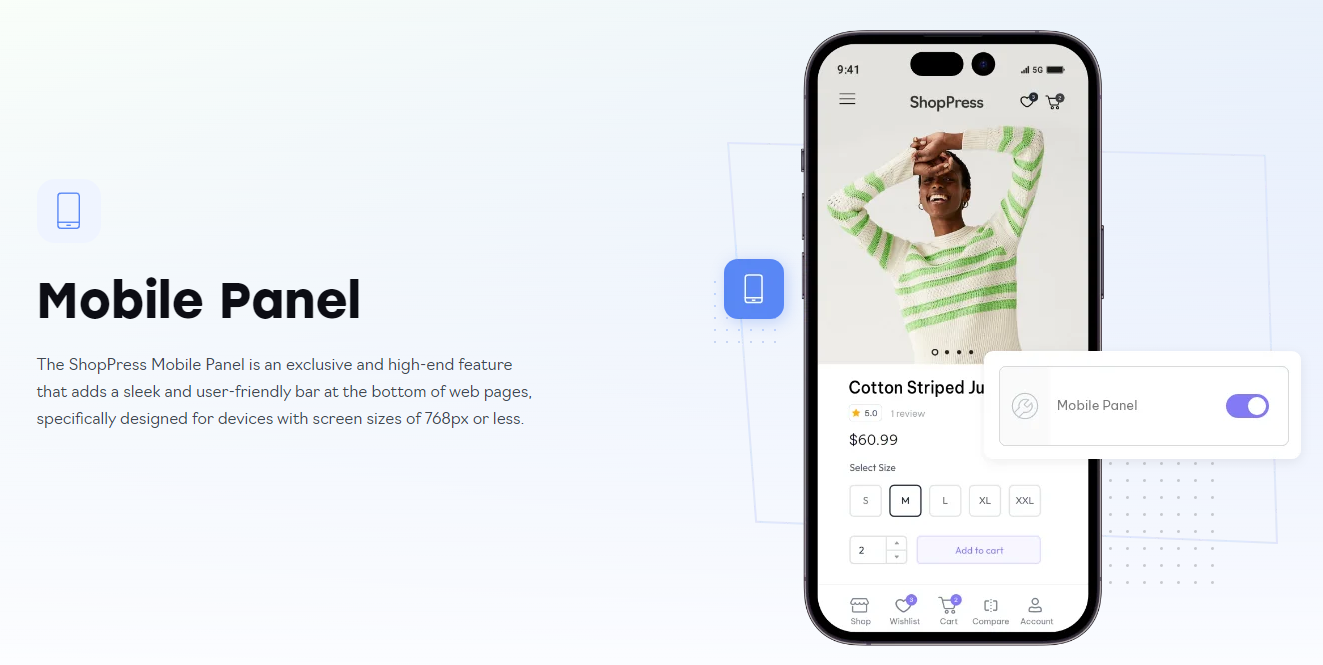
☉ Mobile Panel
↳ Display a sticky menu of the shop links on the mobile
☉ Off-Canvas Widget
☉ Infinite Scroll for Shop Page
☉ Ajax Load More Button
☉ Product Filter
☉ Product Thumbnail Render Size
☉ Product Featured Image Render Size
☉ Products Gallery Image Render Size
☉ Change Product Image on Hover
☉ Stock Level
☉ Stock Progress Bar
☉ Product Next/Perv Navigation
☉ Call for Price
☉ Suggest Price
☉ Catalog Mode
☉ Quick Checkout
☉ Sales Notification
☉ Thumbnails Slider in the Loop
☉ Image Marker (Hotspot)
☉ Product Gallery
☉ Brands
↳ Display brands on the product page
↳ Display brand image on the Brand page title
↳ Display brand products count on the brand page title
↳ Display brands on the products loop
↳ Customize the Brands title
☉ Pre-Order
↳ Custom availability date label for the Pre-Order
↳ Custom price label for the Pre-Order
↳ Custom Add to Cart text for the Pre-Order products
↳ Show countdown of Pre-Order on the product page
↳ Available date for the Pre-Order
↳ Available time for the Pre-Order
↳ Manage price of the Pre-Order products
☉ Partial Payment
↳ Deposit days after next payment
↳ Deposit Amount
↳ Require Login the customers
↳ Disable for specific rules
↳ Custom text and labels
↳ Create custom deposits for categories
↳ Reminder Email
☉ Cross-Sell Popup
↳ Display the cross-sell of the products after add to cart
↳ Set a custom heading for the cross-sell products
↳ Display the cross-sell products as slider
☉ Order Bump
↳ Display order bump on the checkout page
↳ Create custom advanced rules to display the order bump
☉ Mini Cart Drawer
↳ Display cart button
↳ Display checkout button
↳ Open the mini cart after Add to cart
↳ Set custom position of the drawer icon
↳ Set custom opening position of the drawer
↳ Set custom icon for the drawer
☉ Product Badges
↳ Display custom text badge
↳ Display custom image badge
↳ Display discount percentage badge
↳ Create rules for displaying badges
☉ Product Tabs Manager
↳ Create tabs, visible on all products
↳ Customise your tab for each single product
↳ Edit or delete “Reviews” and “Description” tabs
↳ Place your tabs where you prefer in single builder
↳ Present the product tabs in an accordion view
↳ Hide the tabs on mobile devices
⚙️ Single product page widgets
Product title
Product price
Product description
Product images
Product upsells
Product stock
Product meta
Product breadcrumb
Product tabs
Product categories
Related Product
Product rating
Product content
Product add to cart
Product reviews
Product attributes
Product sharing
Product navigation
Checkout page widgets
Checkout additional fields
Checkout form billing
Checkout form shipping
Checkout payment
Checkout coupon form
Checkout login form
Checkout order review
⚙️ Cart page widgets
Cart total
Cart table
Return to shop
Cart empty message
Cart coupon
Cross-sell products
⚙️ My account page widgets
My account
Dashboard
Dashboard orders
Dashboard downloads
Dashboard edit account
WooCommerce addresses
⚙️ Loop builder widgets
Recent Products
Related Products
Sale Products
Top Rated Products
Best Selling Products
Featured Products
Cross Sell Products
Up Sell Products
Loop product meta
Loop product categories
Loop product tags
Loop product thumbnail
Loop product title
Loop product description
Loop product price
Loop product stock
Loop product SKU
Loop product rating
Loop product review
Loop product add to cart
External services
This plugin connects to the following third-party or external services:
- Katademos (template library): Used to fetch Elementor templates when you open the template library in the editor. The request is sent when the library is loaded. The service is provided by the plugin author. Terms | Privacy
- WhatsApp: Used only to build share links (e.g. for wishlist). No data is sent to WhatsApp by the plugin; the user’s browser may open WhatsApp with the shared URL when they click the link.
- QR Server (api.qrserver.com): Used to generate product QR code images. The product URL is sent when a page with the QR widget is displayed. Terms | Privacy
- WordPress.org API: Used to fetch plugin information (e.g. changelog) in the admin. Only the plugin slug is sent. This is part of WordPress.org infrastructure.
- Climaxthemes (announcements): Used to fetch announcement content shown in the plugin admin. No personal data is sent. The service is provided by the plugin author. Terms | Privacy
Screenshots




Blocks
This plugin provides 76 blocks.
- My Wishlist
- Order Details Customer
- Order Details
- Order Review
- Orders
- My Account
- Login
- My Account Notifications
- Downloads
- Addresses
- Dashboard
- Edit Account
- Product Collection
- Upsell Product
- Cross-sells Product
- Related Product
- Shop Product
- Shop Filters
- Compare
- Loop SKU
- Loop Sale Flash
- Loop Title
- Loop Rating
- Loop Add to cart
- Loop Price
- Loop Product Stock
- Wishlist Button
- Loop Discount
- Compare Button
- Loop Thumbnail
- Loop Tags
- Loop Description
- Loop quick view
- Loop flash sale countdown
- Loop Review
- Loop Categories
- Cart Coupon
- Cart Totals
- Cart Table
- Product SKU
- Product Sharing
- Product Breadcrumb
- Product Attributes
- Product Title
- Product Tabs
- Product Size Chart
- Product Video
- Product Rating
- Add to Cart
- Product Price
- Product Stock
- Product Suggest Price
- Product Images
- Wishlist Button
- Product Discount
- Compare Button
- Product Tags
- Product Stock Progress Bar
- Product Description
- Product Short Description
- Product Sale Badge
- Call for Price
- Product Weight
- Product Navigation
- Product Flash Sale Countdown
- Product Review
- Product Categories
- Cart return to shop
- Cart Empty Message
- Checkout Coupon Form
- Checkout Login Form
- Payment Method
- Additional Fields
- Shipping Form
- Form Billing
- Checkout Order Review
Installation
This section describes how to install the ShopPress plugin and get it working.
1. Install via WordPress Dashboard
- Go to the WordPress Dashboard and navigate to the “Plugins” > “Add New” section.
- In the Search Plugins field, type “ShopPress.”
- Click on the “Install Now” button.
- Once the installation completes, click on the “Activate” button.
2. Install via Zip File
- Download the ShopPress plugin as a zip file from webnus.
- Go to the WordPress Dashboard and navigate to “Plugins” > “Add New.”
- Click on the “Upload Plugin” button at the top of the page.
- Select the downloaded ShopPress zip file and click on “Install Now.”
- Once installed, click on the “Activate” button.
3. Configure
- As ShopPress is a WooCommerce-based plugin, WooCommerce must be installed and activated to use ShopPress.
- After activating ShopPress, configure it according to your preferences.
FAQ
-
Where can I access the documentation for ShopPress?
-
You can find comprehensive documentation for ShopPress, including installation instructions, activation guidelines, widget usage, module configuration, and template customization, in its dedicated documentation section.
-
Which plugins are necessary to utilize ShopPress?
-
ShopPress requires two essential plugins: Elementor and WooCommerce. These plugins are essential for optimal functionality and seamless integration with ShopPress.
-
Is Elementor Pro required for ShopPress WooCommerce Builder?
-
No, Elementor Pro is not required for ShopPress WooCommerce Builder. You can utilize all the features of ShopPress WooCommerce Builder with the free version of Elementor.
-
Is ShopPress available for free?
-
Yes. The free version includes builders for shop, product, cart, checkout, wishlist, compare, and product loops so you can build and customize your store.
-
Are add-ons required for ShopPress WooCommerce Builder?
-
No, you do not need to have Elementor Pro for ShopPress WooCommerce Builder. Additionally, the paid add-ons of WooCommerce are not necessary either. You can fully utilize all the features and functionalities of ShopPress WooCommerce Builder with the free version of Elementor and also access to all of the WooCommerce add-ons features in it.
-
Can I create and design my own template using ShopPress?
-
Absolutely! With ShopPress, you have the freedom to create your own custom template. ShopPress offers two options for template creation: a default template and a template library. For a custom template, you can start from scratch with a default template and easily add the required widgets from ShopPress using a simple drag-and-drop interface. Alternatively, you can choose from the template library provided by ShopPress, which offers a selection of pre-designed templates to save you time and effort.
-
Does ShopPress have a support center available?
-
Certainly! ShopPress Elementor WooCommerce builder provides a dedicated support team that is available 24/7. We are ready to assist users with any concerns, provide guidance, and answer any questions you may have. You can head to the helpdesk and create a ticket there.
-
What are the minimum requirements to use ShopPress?
-
ShopPress has been extensively tested and is compatible with the latest versions of WordPress, Elementor and WooCommerce.
-
Does ShopPress have any impact on WooCommerce speed or page speed?
-
ShopPress is built with modern practices and is designed to work efficiently with WooCommerce. Performance depends on your hosting, theme, and other plugins; we recommend testing on a staging site.
-
Can beginners with limited coding experience use ShopPress effectively?
-
Yes. ShopPress works with Elementor’s drag-and-drop interface. The Styler tool and widgets allow customization without coding.
Reviews

Contributors & Developers
“ShopPress – Shop Builder for Elementor and WooCommerce” is open source software. The following people have contributed to this plugin.
Contributors

Translate “ShopPress – Shop Builder for Elementor and WooCommerce” into your language.
Interested in development?
Browse the code, check out the SVN repository, or subscribe to the development log by RSS.
Changelog
1.5.0 – 19 February 2026
Improved: Internationalization (i18n) by ensuring all strings are static for translation parsers.
Compatibility: Latest version of WordPress, WooCommerce, and Elementor.
Fixed: Unified all text domains to match the plugin slug (shop-press).
Fixed: Refactored gettext functions to ensure no variables are used in translation strings.
Fixed: Updated SweetAlert2 library to the latest version to address privacy and security guidelines.
Fixed: Removed redundant CodeMirror library from the plugin; now utilizing the WordPress core version.
Fixed: Mini Card Drawer issue
Fixed: Minor issues
1.4.15 – 7 May 2025
Added: Qr Code Widget
Improved: Styler
Fixed: Checkout Style
Fixed: Minor issues
1.4.14 – 12 February 2025
Improved: Styler
Fixed: Minor issues
1.4.13 – 02 February 2025
Fixed: Minor issues
1.4.12 – 21 October 2024
Fixed: Minor issues
1.4.11 – 20 October 2024
Fixed: Minor issues
1.4.10 – 16 October 2024
Fixed: Minor issues
1.4.9 – 14 September 2024
Added: Products hotspot widget (Pro)
Added: Ajax products tabs widget (Pro)
Fixed: Drawer close icon on mobile
Fixed: Display shipping total in shopify checkout module
Fixed: Convert dropdown to drawer on mobile